 Firefox
 1 / 10
About Belvare Font
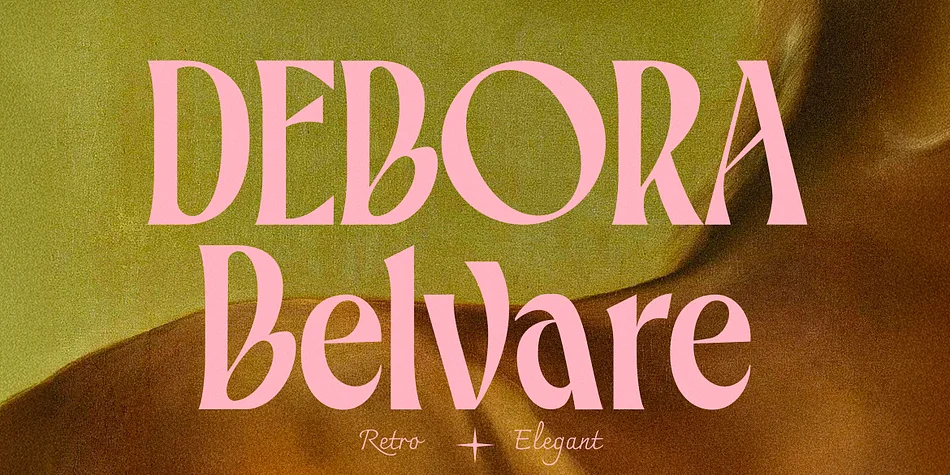
Belvare, from CCS Type, brings distinctive warmth to display typography with its rounded letter forms and softened serifs. The most striking feature is its generous curves, especially the oversized O and C characters that give the font real personality while keeping every word legible. This retro-leaning serif feels both nostalgic and contemporary, making it ideal for heritage branding or modern startups searching for presence without pretension.
The font comes in three weights (Light, Regular, and Bold), letting you build typographic hierarchy without swapping typefaces. Stylistic alternates and ligatures are baked in, so you can add subtle variations and prevent longer passages from feeling repetitive. Multilingual support means you can use it across different markets and languages.
Belvare works beautifully for luxury cosmetics and skincare packaging, high-end restaurant menus and wine labels, independent bookcovers and literary magazine mastheads, and editorial spreads where headlines need warmth alongside authority. The rounded forms keep it approachable while the serif structure gives it enough weight for serious design work. It's the kind of typeface that makes modest, thoughtful projects read as intentional and premium without trying too hard. Grab Belvare on Creative Fabrica.
Style & Use Cases
- Overall Style
- Eye-catching, Bold
- Use Case
- Headlines, Logos
- Ideal For
- posters, branding, and social media graphics
- Pairs With
- a readable sans or serif for body
How to Install Belvare Font
Step-by-step instructions for every platform
- 1Download the Belvare font file (.ttf or .otf).
- 2Locate the downloaded file in your Downloads folder.
- 3Right-click the font file.
- 4Select "Install" to install for the current user, or "Install for all users" to make it available system-wide.
- 5Belvare is now available in Word, Photoshop, Illustrator, and all other apps.
More by CCS Type
View all →
Browse fonts by theme
Curated collections →Saw a font in a picture? Identify any font from an image with our free Font Finder.
More Display Fonts
Browse all →







What pairs well with Belvare Font?
Belvare Font is a display font that shines as a display or heading face. Pair it with a clean sans-serif or serif font for body text — the contrast creates a clear hierarchy while the two styles stay balanced and easy to read.




Belvare Font
by CCS Type
Reviewed by the FontBoxDL team · Updated September 2026