
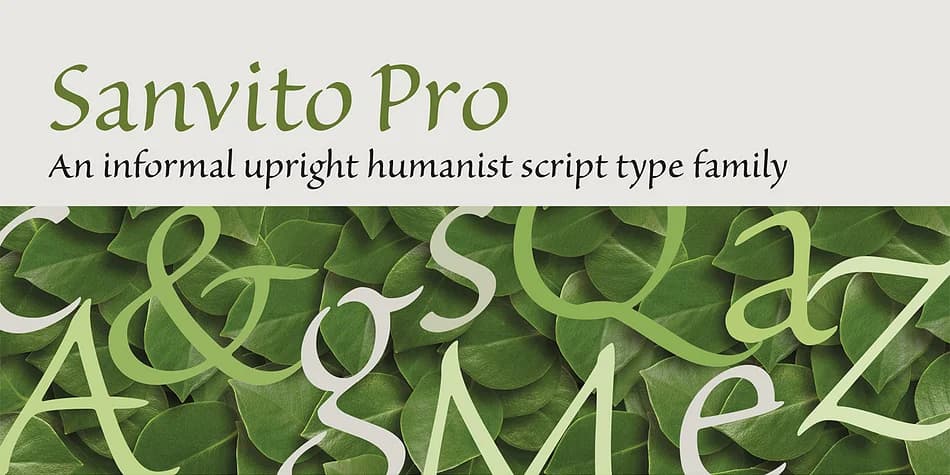
About Sanvito® Pro Font
Sanvito Pro is Robert Slimbach's upright script, designed in 1993 and based on the practical letterforms that Renaissance humanist scribes used in their manuscripts. Rather than pursuing the typical flowing elegance of most display scripts, this one prioritizes readable structure while keeping the warmth of genuine handwriting intact. It manages to feel genuinely personal without tipping into overly decorative territory, hitting that sweet spot between human touch and solid typographic clarity.
What makes it work across so many different contexts is how legible it stays while still maintaining real character. Wedding invitation suites benefit from the handwritten sensibility, but paired with the durability and readability that loose calligraphy simply can't provide. Boutique product labels and wine packaging read as cultivated and sophisticated rather than trendy. Small presses and independent bookstores often reach for it when designing identity materials where they need both intelligence and personality without cold formality. You'll also find it strong enough for editorial headers, magazine spreads, and event flyers where personality and readability both need to matter.
This typeface functions as a genuine display workhorse, not just another single-purpose script. Grab Sanvito Pro from Creative Fabrica and you're adding something to your toolkit that earns its place across real projects.
Style & Use Cases
- Overall Style
- Eye-catching, Bold
- Use Case
- Headlines, Logos
- Ideal For
- posters, branding, and social media graphics
- Pairs With
- a readable sans or serif for body
How to Install Sanvito® Pro Font
Step-by-step instructions for every platform
- 1Download the Sanvito® Pro font file (.ttf or .otf).
- 2Locate the downloaded file in your Downloads folder.
- 3Right-click the font file.
- 4Select "Install" to install for the current user, or "Install for all users" to make it available system-wide.
- 5Sanvito® Pro is now available in Word, Photoshop, Illustrator, and all other apps.

More Display Fonts
Browse all →







What pairs well with Sanvito® Pro Font?
Sanvito® Pro Font is a display font that shines as a display or heading face. Pair it with a clean sans-serif or serif font for body text — the contrast creates a clear hierarchy while the two styles stay balanced and easy to read.



Sanvito® Pro Font
by Adobe
Reviewed by the FontBoxDL team · Updated June 2026