 Firefox
 1 / 10
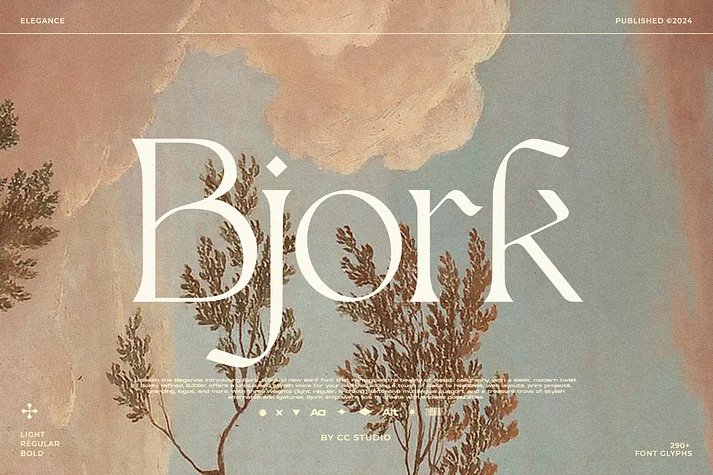
About Bjork Font
Picture yourself designing materials for an upscale brand or developing a luxury identity system, on the hunt for something polished yet undeniably current. Bjork, a serif typeface by CCS Type, answers that call. This font draws inspiration from classical calligraphy traditions but refines them with clean, contemporary proportions that feel distinctly modern. It performs beautifully as a bold headline treatment or a restrained body text, maintaining presence and clarity across any size.
Bjork truly excels when you want distinct character without overreaching. Consider its practical applications: high-end product packaging for boutique skincare lines, sophisticated wedding invitation suites, editorial mastheads in design-forward publications, and upscale restaurant branding that conveys quality and craft. Its three weights (light, regular, bold) let you build visual hierarchy fluidly, eliminating the need to hunt for another font when you need contrast. Extensive multilingual support ensures it works across international projects and global campaigns.
The font includes a full set of stylistic alternates and ligatures. You'll find them through the glyphs panel in Adobe applications (Window > Glyphs in Photoshop, Type > Glyphs in Illustrator), which lets you swap between standard and more ornamental letterforms depending on what your design calls for. This flexibility means you get more mileage from a single font file. Grab Bjork on Creative Fabrica and add this refined serif to your collection.
Style & Use Cases
- Overall Style
- Bold, Distinctive
- Use Case
- Headlines, Posters
- Ideal For
- logos, packaging, and standout titles
- Pairs With
- a neutral sans-serif
How to Install Bjork Font
Step-by-step instructions for every platform
- 1Download the Bjork font file (.ttf or .otf).
- 2Locate the downloaded file in your Downloads folder.
- 3Right-click the font file.
- 4Select "Install" to install for the current user, or "Install for all users" to make it available system-wide.
- 5Bjork is now available in Word, Photoshop, Illustrator, and all other apps.
More by CCS Type
View all →
Browse fonts by theme
Curated collections →Saw a font in a picture? Identify any font from an image with our free Font Finder.
More Decorative Fonts
Browse all →







What pairs well with Bjork Font?
Bjork Font is a decorative font that shines as a display or heading face. Pair it with a clean sans-serif or serif font for body text — the contrast creates a clear hierarchy while the two styles stay balanced and easy to read.




Bjork Font
by CCS Type
Reviewed by the FontBoxDL team · Updated June 2026