 Firefox
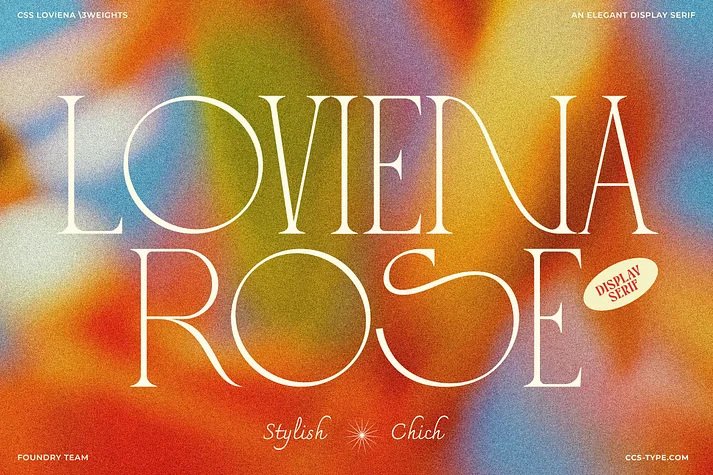 1 / 10
About Loviena Font
Loviena, a display serif by CCS Type, balances classical proportion with understated personality through its all-caps construction. The geometric letterforms sit alongside soft femininity, creating a typeface that reads as sophisticated without unnecessary weight or pretense. It's the kind of serif that works because it listens to context instead of demanding visual dominance.
Designers reach for Loviena when refinement actually needs to serve the brand rather than overshadow it. Wedding invitation suites benefit greatly from its composed elegance, as do upscale restaurant menus, luxury jewelry catalogs, and boutique beauty product labels. The typeface succeeds across these varied categories because it feels intentional and craft-driven rather than trend-led, which signals quality to audiences who notice the distinction. Three weights (Regular, Semibold, Bold) provide the hierarchy flexibility you need without forcing a complete font switch, while stylistic alternates and ligatures let you customize individual characters and add personality across your layouts. The multilingual character set extends utility across global clients and international projects.
This is the right choice when your audience responds to restraint, proportion, and visual intelligence rather than novelty. Get Loviena on Creative Fabrica and bring its measured authority to your next premium project.
Style & Use Cases
- Overall Style
- Bold, Distinctive
- Use Case
- Headlines, Posters
- Ideal For
- logos, packaging, and standout titles
- Pairs With
- a neutral sans-serif
How to Install Loviena Font
Step-by-step instructions for every platform
- 1Download the Loviena font file (.ttf or .otf).
- 2Locate the downloaded file in your Downloads folder.
- 3Right-click the font file.
- 4Select "Install" to install for the current user, or "Install for all users" to make it available system-wide.
- 5Loviena is now available in Word, Photoshop, Illustrator, and all other apps.
More by CCS Type
View all →
Browse fonts by theme
Curated collections →Saw a font in a picture? Identify any font from an image with our free Font Finder.
More Decorative Fonts
Browse all →







What pairs well with Loviena Font?
Loviena Font is a decorative font that shines as a display or heading face. Pair it with a clean sans-serif or serif font for body text — the contrast creates a clear hierarchy while the two styles stay balanced and easy to read.




Loviena Font
by CCS Type
Reviewed by the FontBoxDL team · Updated June 2026