
 1 / 8
1 / 8About MAGICAL BRUSH Font
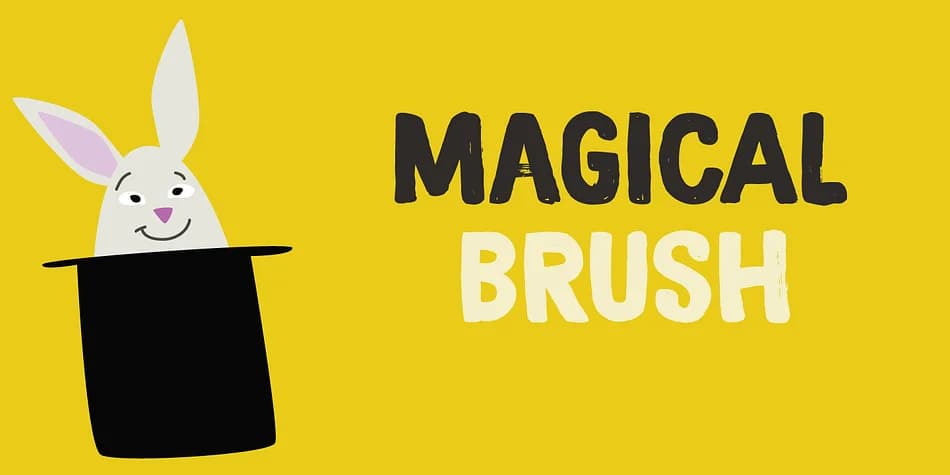
When you need handwritten energy without sacrificing control, Magical Brush by Hanoded delivers exactly that. This display font was painstakingly created with a size 3 brush and Chinese ink, applied to copier paper rather than expensive watercolor stock. That deliberate choice gives the letterforms their characteristic slightly worn texture: the kind of aesthetic you can't fake with digital smoothing. The designer's restraint in not over-distressing the strokes is what makes this typeface work across so many different contexts, from delicate headlines to bold statements.
You can use it for vintage poster designs, holiday greeting cards, book cover lettering, or hand-drawn product labels on artisan goods. The font comes in two versions: a clean baseline style and a speckled variant that adds even more character and texture for designs where you want that extra grit and personality. At display sizes, the brushwork really comes through, making it especially strong for packaging design or statement headlines that need to catch the eye. The speckled option works particularly well when you're aiming for that worn-in, handcrafted aesthetic without needing to photograph actual brushwork.
Grab Magical Brush from Creative Fabrica and you've got a typeface that feels genuinely made by hand, not generated.
Style & Use Cases
- Overall Style
- Eye-catching, Bold
- Use Case
- Headlines, Logos
- Ideal For
- posters, branding, and social media graphics
- Pairs With
- a readable sans or serif for body
How to Install MAGICAL BRUSH Font
Step-by-step instructions for every platform
- 1Download the MAGICAL BRUSH font file (.ttf or .otf).
- 2Locate the downloaded file in your Downloads folder.
- 3Right-click the font file.
- 4Select "Install" to install for the current user, or "Install for all users" to make it available system-wide.
- 5MAGICAL BRUSH is now available in Word, Photoshop, Illustrator, and all other apps.
More by Hanoded
View all →

More Display Fonts
Browse all →







What pairs well with MAGICAL BRUSH Font?
MAGICAL BRUSH Font is a display font that shines as a display or heading face. Pair it with a clean sans-serif or serif font for body text — the contrast creates a clear hierarchy while the two styles stay balanced and easy to read.



MAGICAL BRUSH Font
by Hanoded
Reviewed by the FontBoxDL team · Updated June 2026