 Firefox

 1 / 4
About Snap Cube Font
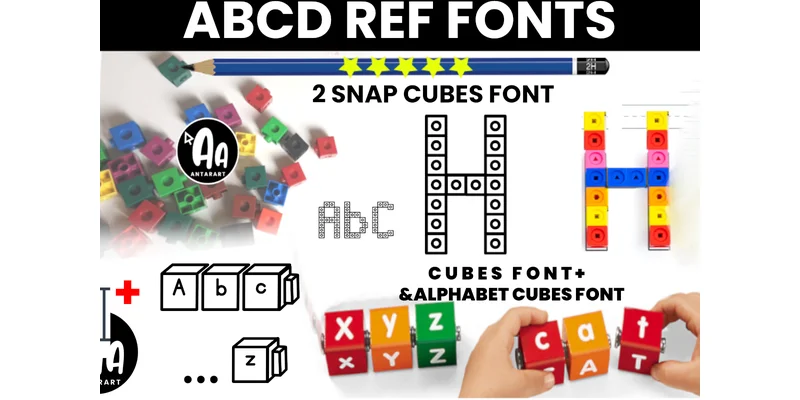
Snap Cube Font by AntarArt is a display typeface built around the visual language of snap cubes, transforming uppercase letters into blocky, three-dimensional shapes that immediately evoke familiar classroom learning tools. The geometric letterforms render with the stackable, modular appearance of actual physical manipulatives, making it an excellent choice for alphabet worksheets, phonics flashcards, letter-formation practice sheets, word-building handouts, and hands-on learning kits that educators and homeschoolers create regularly for young learners.
Typing with this font creates words that appear physically assembled from individual letter blocks, which strengthens the visual connection between digital resources and tactile learning experiences. Teachers, homeschoolers, and curriculum creators can use it to design letter-tracing exercises, word-building activities, alphabetical sorting games, and learning station materials that keep young students engaged without requiring separate physical manipulative sets. The consistent geometric structure works equally well for school bulletin board displays, classroom resource handouts, printed learning guides, and DIY practice materials that reinforce letter shapes and word composition skills.
Because each letter maintains the dimensional, interlocking quality of actual snap cubes, students develop stronger visual memory of letter formation. The typeface bridges the gap between digital and hands-on instruction, making it particularly valuable for teachers who want to transition between physical and screen-based learning. Download Snap Cube Font on Creative Fabrica to start building your educational resource collection.
Style & Use Cases
- Overall Style
- Eye-catching, Bold, Alphabet Tracing
- Use Case
- Headlines, Logos
- Ideal For
- posters, branding, and social media graphics
- Pairs With
- a readable sans or serif for body
How to Install Snap Cube Font Font
Step-by-step instructions for every platform
- 1Download the Snap Cube Font font file (.ttf or .otf).
- 2Locate the downloaded file in your Downloads folder.
- 3Right-click the font file.
- 4Select "Install" to install for the current user, or "Install for all users" to make it available system-wide.
- 5Snap Cube Font is now available in Word, Photoshop, Illustrator, and all other apps.
More by AntarArt
View all →
Browse fonts by theme
Curated collections →Saw a font in a picture? Identify any font from an image with our free Font Finder.
More Display Fonts
Browse all →







What pairs well with Snap Cube Font?
Snap Cube Font is a display font that shines as a display or heading face. Pair it with a clean sans-serif or serif font for body text — the contrast creates a clear hierarchy while the two styles stay balanced and easy to read.




Snap Cube Font
by AntarArt
Reviewed by the FontBoxDL team · Updated November 2026
One-time purchase