 Firefox
 1 / 5
1 / 5About Faces Reaction Font
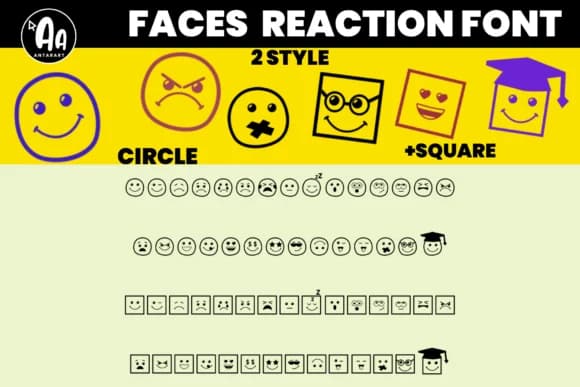
This font lets you express the full spectrum of human emotion in a visual way. Faces Reaction, by AntarArt, is a dingbats collection that trades fine detail for bold, immediate feeling. Two distinct styles serve different needs: circle-based faces work as traditional, friendly emoticons, while square-shaped versions conjure a digital or robotic aesthetic that's equally expressive.
Use it for classroom emotion posters where kids actually point to how they're feeling, or build therapy session tracking charts that make daily check-ins feel less clinical and more approachable. SEL curriculum designers will find it saves real time on behavior management worksheets and social skills visuals. Wedding stationery makers often pair emotion charts with playful designs for bridal shower games or anniversary milestone cards. Counseling room walls benefit from the clean, non-threatening look these faces bring, especially when printed large on cardstock.
The glyphs cover a full range of expressions without needing different weights or alternate versions. Pair Faces Reaction with a straightforward sans-serif like Open Sans or Montserrat for any accompanying labels or instructions, letting the faces carry the emotional weight while the typography stays neutral in the background. Grab it from Creative Fabrica and start building more human, feeling-centered resources for your classroom.
Style & Use Cases
- Overall Style
- Iconographic, Feelings Chart
- Use Case
- Icons, Accents
- Ideal For
- ornaments, bullets, and decorative flourishes
- Pairs With
- any text font
How to Install Faces Reaction Font
Step-by-step instructions for every platform
- 1Download the Faces Reaction font file (.ttf or .otf).
- 2Locate the downloaded file in your Downloads folder.
- 3Right-click the font file.
- 4Select "Install" to install for the current user, or "Install for all users" to make it available system-wide.
- 5Faces Reaction is now available in Word, Photoshop, Illustrator, and all other apps.
More by AntarArt
View all →

Browse fonts by theme
Curated collections →Saw a font in a picture? Identify any font from an image with our free Font Finder.
More Dingbats Fonts
Browse all →







What pairs well with Faces Reaction Font?
Faces Reaction Font is a versatile dingbats font that works for both headings and body text. Pair it with a contrasting sans-serif or serif font to add visual interest and a clear distinction between titles and body copy.



Faces Reaction Font
by AntarArt
Reviewed by the FontBoxDL team · Updated June 2026