
 1 / 10
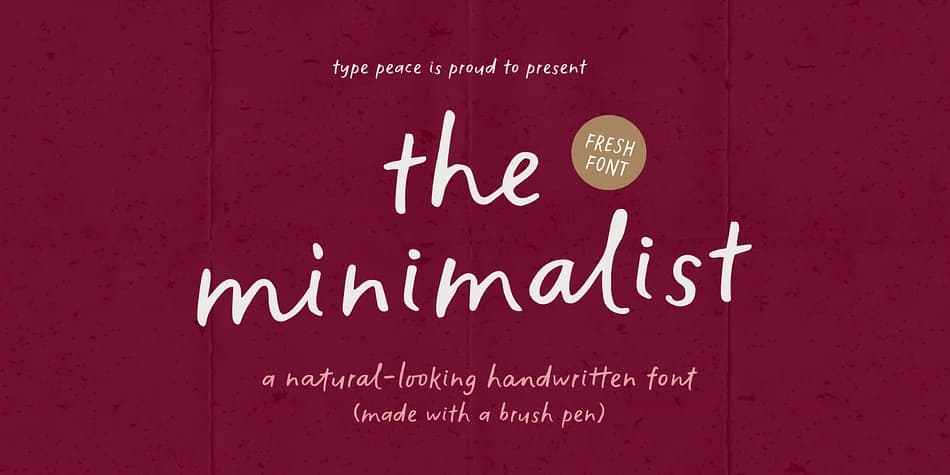
About The Minimalist Font
The Minimalist is a natural handwritten typeface created with real brush pen strokes. Its organic texture and gentle flow capture the authenticity of hand lettering, bringing a sense of warmth and character to every word. With two variations of each letter and rich OpenType features, it offers natural rhythm and fluidity across your designs. Complete with multilingual support, The Minimalist is ideal for projects that seek a genuine, artistic, and effortlessly human touch.
Features:
- 2 fonts: Regular (default set) and Alt (ss01)
- 2 versions of each letter
- Multilingual support - 700+ glyphs
- OpenType features: Standard Ligatures, Discretionary Ligatures, Stylistic Sets, Stylistic Alternates
The font automatically replaces two identical adjacent letters with an alternate version to create a more natural handwritten look. If this feature isn’t applied automatically, enable the OTF Standard Ligatures option.
Mix & match letter sets and explore all the OpenType features this font offers to create dynamic letter combinations!
Supported Languages: English, Western European, Central European, South Eastern European, Oceanian, Vietnamese, South American
Style & Use Cases
- Overall Style
- Eye-catching, Bold
- Use Case
- Headlines, Logos
- Ideal For
- posters, branding, and social media graphics
- Pairs With
- a readable sans or serif for body
How to Install The Minimalist Font
Step-by-step instructions for every platform
- 1Download the The Minimalist font file (.ttf or .otf).
- 2Locate the downloaded file in your Downloads folder.
- 3Right-click the font file.
- 4Select "Install" to install for the current user, or "Install for all users" to make it available system-wide.
- 5The Minimalist is now available in Word, Photoshop, Illustrator, and all other apps.
More by type peace
View all →
More Display Fonts
Browse all →







What pairs well with The Minimalist Font?
The Minimalist Font is a display font that shines as a display or heading face. Pair it with a clean sans-serif or serif font for body text — the contrast creates a clear hierarchy while the two styles stay balanced and easy to read.



The Minimalist Font
by type peace
Reviewed by the FontBoxDL team · Updated April 2026