 Firefox

 1 / 3
Loading font…
About Terrage Font
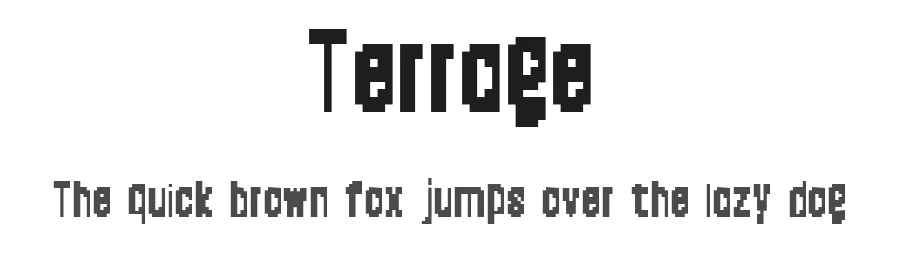
Terrage is a display font engineered for headlines and bold visual impact. With 102 individual glyphs and support for more than 107 languages based on the Latin alphabet, this free typeface brings confident presence to posters, social media graphics, event invitations, and packaging labels. The Regular weight provides straightforward application across a range of design projects without the overhead of managing multiple weight variations.
Where Terrage truly excels is in situations demanding visual distinction without unnecessary decorative complexity. Designers consistently reach for it when developing book covers, magazine headlines, wedding invitations, and website title graphics where clarity and impact must work equally hard. The robust multilingual support guarantees international campaigns and multilingual content remain fully accessible without needing to source alternative typefaces mid-project or compromise on visual consistency.
Terrage is available as a free download directly from the foundry website, with specific licence terms outlined on the download page, though commercial use rights require reviewing those conditions carefully. Choose Terrage when you need a display font that prioritizes genuine legibility and visual punch over purely decorative flourishes, and when you want the built-in advantage of comprehensive international language coverage from the first download.
Style & Use Cases
- Overall Style
- Eye-catching, Bold, Display
- Use Case
- Headlines, Logos
- Ideal For
- posters, branding, and social media graphics
- Pairs With
- a readable sans or serif for body
Terrage Specifications
| Font Family | Terrage |
| Style | Regular |
| Full Name | Terrage |
| Version | 1.0 |
| Weight | 400 (Regular) |
| Glyph Count | 102 glyphs |
| PostScript Name | Terrage |
| Designer | terrage |
| Format | TTF (TrueType) |
| File Size | 23.2 KB |
Languages Supported
Terrage supports 107 languages.
How to Install Terrage Font
Step-by-step instructions for every platform
- 1Download the Terrage font file (.ttf or .otf).
- 2Locate the downloaded file in your Downloads folder.
- 3Right-click the font file.
- 4Select "Install" to install for the current user, or "Install for all users" to make it available system-wide.
- 5Terrage is now available in Word, Photoshop, Illustrator, and all other apps.
Browse fonts by theme
Curated collections →Saw a font in a picture? Identify any font from an image with our free Font Finder.
More Display Fonts
Browse all →







What pairs well with Terrage Font?
Terrage Font is a display font that shines as a display or heading face. Pair it with a clean sans-serif or serif font for body text — the contrast creates a clear hierarchy while the two styles stay balanced and easy to read.




Premium Display Fonts
★ PremiumWant something with more weights, glyphs, and commercial polish? These premium display fonts are worth a look.




Terrage Font
by Terrage
Reviewed by the FontBoxDL team · Updated October 2026