 Firefox

 1 / 3
Loading font…
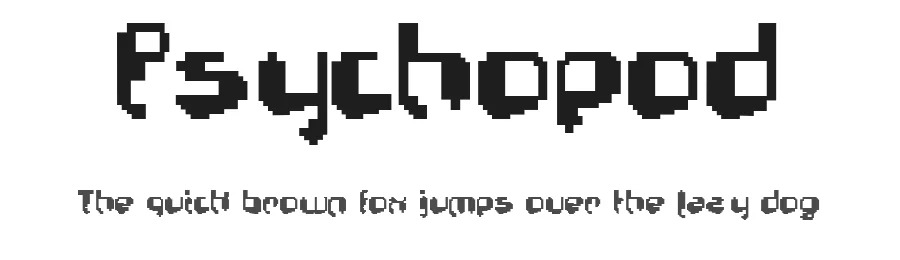
About Psychopod Font
Psychopod is a distinctively pixel-based display font that brings authentic retro digital aesthetics to contemporary design work. With its blocky, grid-aligned letterforms, this typeface captures the charm of early computer graphics and 8-bit gaming culture. The font supports over 104 Latin-based languages, making it accessible to a global audience, and includes 93 glyphs for essential typographic needs. Its straightforward and clean construction makes it readable at any size while maintaining that distinctive pixelated character.
This display font excels in projects that embrace vintage computing aesthetics or digital nostalgia. Indie game developers can use it for in-game menus, title screens, and UI elements, while graphic designers might incorporate it into retro-style posters, album covers, or social media graphics with that distinctive pixel aesthetic. Branding agencies exploring nostalgic themes could apply it to logos for tech startups or digital-first brands seeking authentic retro visual identity. Creative professionals and visual artists working on pixel art compositions, digital illustration projects, or retro-themed websites will find it valuable for capturing that era-specific aesthetic.
Available free for personal use only, with a commercial licence available from the designer. Psychopod works best for projects that deliberately and authentically reference retro digital culture or pursue that characteristic pixelated style.
Style & Use Cases
- Overall Style
- Eye-catching, Bold, Pixel
- Use Case
- Headlines, Logos
- Ideal For
- posters, branding, and social media graphics
- Pairs With
- a readable sans or serif for body
Psychopod Specifications
| Font Family | Psychopod |
| Style | Normal |
| Full Name | Psychopod |
| Version | 1.0 Wed Aug 05 10:24:03 1998 |
| Weight | 400 (Regular) |
| Glyph Count | 93 glyphs |
| PostScript Name | Psychopod |
| Format | TTF (TrueType) |
| File Size | 26.5 KB |
Languages Supported
Psychopod supports 104 languages.
How to Install Psychopod Font
Step-by-step instructions for every platform
- 1Download the Psychopod font file (.ttf or .otf).
- 2Locate the downloaded file in your Downloads folder.
- 3Right-click the font file.
- 4Select "Install" to install for the current user, or "Install for all users" to make it available system-wide.
- 5Psychopod is now available in Word, Photoshop, Illustrator, and all other apps.
Browse fonts by theme
Curated collections →Saw a font in a picture? Identify any font from an image with our free Font Finder.
More Display Fonts
Browse all →







What pairs well with Psychopod Font?
Psychopod Font is a display font that shines as a display or heading face. Pair it with a clean sans-serif or serif font for body text — the contrast creates a clear hierarchy while the two styles stay balanced and easy to read.




Premium Display Fonts
★ PremiumWant something with more weights, glyphs, and commercial polish? These premium display fonts are worth a look.




Psychopod Font
Reviewed by the FontBoxDL team · Updated October 2026
License: Free for personal use