 Firefox

 1 / 3
Loading font…
About popstarpop Font
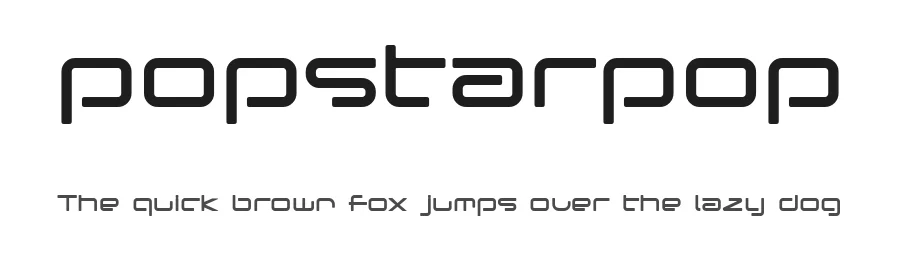
Popstarpop is a display typeface in Regular weight with a distinctly futuristic character that commands attention in design contexts demanding forward momentum and contemporary energy.
This font thrives in bold applications where science-fiction and modern aesthetics converge into something visually distinctive. It performs beautifully in music album artwork, tech startup branding systems, gaming interface headings, and social media graphics specifically designed to interrupt scrolling patterns. Supporting 104+ languages on a Latin base with 98 carefully crafted glyphs, the typeface scales efficiently across international campaigns without losing its characteristic presence or recognizable personality. From podcast cover artwork to retro-futuristic branding that tips nostalgia toward tomorrow, from digital product launches to creative agency portfolios, Popstarpop brings a sense of momentum and technological optimism to any project seeking something beyond conventional typographic solutions.
The font communicates contemporary boldness and futuristic thinking across applications of all sizes. Free for personal use, with a commercial licence available from the designer, Popstarpop rewards thoughtful pairing and strategic application. Combine it with a clean sans-serif for body and supporting text, creating visual breathing room and allowing this typeface to anchor your design hierarchy without overwhelming the layout.
Style & Use Cases
- Overall Style
- Eye-catching, Bold, Futuristic
- Use Case
- Headlines, Logos
- Ideal For
- posters, branding, and social media graphics
- Pairs With
- a readable sans or serif for body
popstarpop Specifications
| Font Family | popstarpop |
| Style | Regular |
| Full Name | popstarpop |
| Version | Macromedia Fontographer 4.1J 03.8.31 |
| Weight | 400 (Regular) |
| Glyph Count | 98 glyphs |
| PostScript Name | Popstarpop |
| Format | TTF (TrueType) |
| File Size | 23 KB |
Languages Supported
popstarpop supports 104 languages.
How to Install popstarpop Font
Step-by-step instructions for every platform
- 1Download the popstarpop font file (.ttf or .otf).
- 2Locate the downloaded file in your Downloads folder.
- 3Right-click the font file.
- 4Select "Install" to install for the current user, or "Install for all users" to make it available system-wide.
- 5popstarpop is now available in Word, Photoshop, Illustrator, and all other apps.
Browse fonts by theme
Curated collections →Saw a font in a picture? Identify any font from an image with our free Font Finder.
More Display Fonts
Browse all →







What pairs well with popstarpop Font?
popstarpop Font is a display font that shines as a display or heading face. Pair it with a clean sans-serif or serif font for body text — the contrast creates a clear hierarchy while the two styles stay balanced and easy to read.




Premium Display Fonts
★ PremiumWant something with more weights, glyphs, and commercial polish? These premium display fonts are worth a look.




popstarpop Font
Reviewed by the FontBoxDL team · Updated October 2026
License: Free for personal use