 Firefox

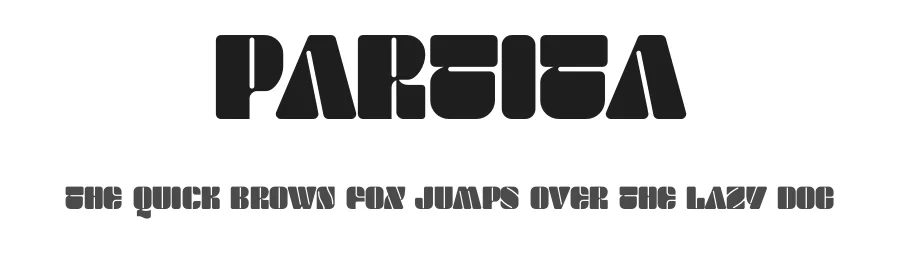 1 / 3
Loading font…
About Partita Font
Picture a wedding invitation suite with distinctive typography that stops guests mid-glance, or signage for a gallery opening. Partita is a display typeface built to command attention at large sizes. With support for 169+ languages across Latin-based scripts, it works across international projects without limiting your audience.
The regular weight handles everything from event invitations and artisan product packaging to DIY craft signage and editorial magazine headlines. Its personality shines brightest when given room to breathe, making it especially suited for gallery exhibition posters, social media graphics, and branding work where bold typography does the talking. The letterforms carry visual weight in a way that keeps layouts grounded even when your design aesthetic leans minimalist. It's the kind of typeface that reads as intentional rather than decorated.
At display sizes (24pt and above), each letterform reveals its full character and presence. Pair it with simpler sans-serifs in body copy to keep things readable, or use it solo for maximum impact in headlines and signage. Let the typeface do the heavy lifting without cluttering your layout with competing visual elements. Try the free demo for personal work, then get the commercial-licensed full version on Creative Fabrica for client and commercial projects.
Style & Use Cases
- Overall Style
- Eye-catching, Bold, Display
- Use Case
- Headlines, Logos
- Ideal For
- posters, branding, and social media graphics
- Pairs With
- a readable sans or serif for body
Partita Specifications
| Font Family | Partita Personal Used |
| Style | Regular |
| Full Name | Partita Personal Used |
| Version | 1.001 |
| Weight | 400 (Regular) |
| Glyph Count | 83 glyphs |
| PostScript Name | PartitaPersonalUsed |
| Format | OTF (CFF) |
| File Size | 273.3 KB |
Languages Supported
Partita supports 169 languages.
How to Install Partita Font
Step-by-step instructions for every platform
- 1Download the Partita font file (.ttf or .otf).
- 2Locate the downloaded file in your Downloads folder.
- 3Right-click the font file.
- 4Select "Install" to install for the current user, or "Install for all users" to make it available system-wide.
- 5Partita is now available in Word, Photoshop, Illustrator, and all other apps.
Browse fonts by theme
Curated collections →Saw a font in a picture? Identify any font from an image with our free Font Finder.
More Display Fonts
Browse all →







What pairs well with Partita Font?
Partita Font is a display font that shines as a display or heading face. Pair it with a clean sans-serif or serif font for body text — the contrast creates a clear hierarchy while the two styles stay balanced and easy to read.




Partita Font
Reviewed by the FontBoxDL team · Updated August 2026