 Firefox
 1 / 8
1 / 8About Nok Font
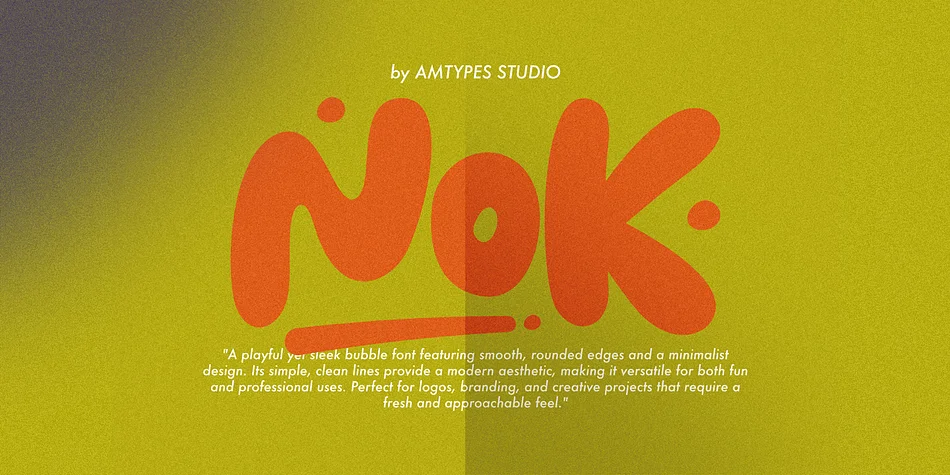
There's something inherently cheerful about this typeface. Nok, designed by Angga Mahardika, takes the softness of classic bubble letterforms and refines them with contemporary sensibility, creating a display font that feels both warmly approachable and visually sophisticated.
The rounded shapes and generous curves open up exciting possibilities across multiple design applications and brand contexts. Indie skincare and beauty brands use Nok for product packaging that commands immediate attention on retail shelves. Greeting card designers appreciate how the letterforms maintain legibility while radiating personality and charm. Podcast cover art, lifestyle brand social media graphics, cafe menu boards, wedding invitation suites, and handmade product labels all benefit from this typeface's playful-yet-polished character. The balance between friendliness and intentionality is precisely what makes Nok stand out against competitors in a crowded marketplace.
Available in both OTF and TTF formats with a complete character set covering uppercase, lowercase, numbers, punctuation, and support for multiple languages, Nok gives you the technical flexibility to work at any scale. Pair it with a clean geometric sans-serif for body text, which creates visual hierarchy without overwhelming the overall design. Grab it on Creative Fabrica and start exploring what this typeface can bring to your next creative project.
Style & Use Cases
- Overall Style
- Eye-catching, Bold
- Use Case
- Headlines, Logos
- Ideal For
- posters, branding, and social media graphics
- Pairs With
- a readable sans or serif for body
How to Install Nok Font
Step-by-step instructions for every platform
- 1Download the Nok font file (.ttf or .otf).
- 2Locate the downloaded file in your Downloads folder.
- 3Right-click the font file.
- 4Select "Install" to install for the current user, or "Install for all users" to make it available system-wide.
- 5Nok is now available in Word, Photoshop, Illustrator, and all other apps.
More by Angga Mahardika
View all →
Browse fonts by theme
Curated collections →Saw a font in a picture? Identify any font from an image with our free Font Finder.
More Display Fonts
Browse all →







What pairs well with Nok Font?
Nok Font is a display font that shines as a display or heading face. Pair it with a clean sans-serif or serif font for body text — the contrast creates a clear hierarchy while the two styles stay balanced and easy to read.




Nok Font
Reviewed by the FontBoxDL team · Updated June 2026