 Firefox
 1 / 7
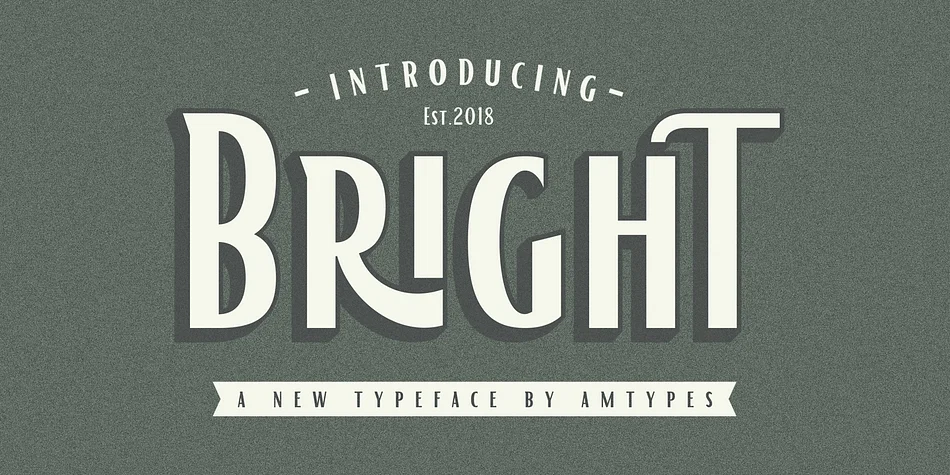
1 / 7About Bright Font
This typeface delivers quiet confidence in display applications. Bright is a sans serif from Angga Mahardika that blends classical restraint with contemporary sensibility, making it equally comfortable on a minimalist tech logo or premium product package. The typeface excels in scenarios where subtlety matters most: clean brand identities, luxury retail signage, boutique skincare labels, and editorial headlines where understatement speaks louder than any decorative flourish.
The real power of Bright lies in its thoughtful alternates and ligatures, which let you add personality and nuanced refinement without juggling multiple fonts. Multi-language support is built in, so you won't scramble for replacements when your work travels internationally. These typographic niceties are accessible through any capable design tool: Adobe Illustrator, Photoshop, InDesign, and CorelDraw X6 and newer all support the OpenType features that unlock the font's full potential and sophistication.
Pair Bright with a warm, readable serif for body text and longer-form reading passages, creating visual rhythm and contrast while keeping everything elegant and composed. The combination gives you both sophistication and breathing room on the page. You'll find Bright on Creative Fabrica, ready to become a reliable workhorse in your design toolkit.
Style & Use Cases
- Overall Style
- Eye-catching, Bold
- Use Case
- Headlines, Logos
- Ideal For
- posters, branding, and social media graphics
- Pairs With
- a readable sans or serif for body
How to Install Bright Font
Step-by-step instructions for every platform
- 1Download the Bright font file (.ttf or .otf).
- 2Locate the downloaded file in your Downloads folder.
- 3Right-click the font file.
- 4Select "Install" to install for the current user, or "Install for all users" to make it available system-wide.
- 5Bright is now available in Word, Photoshop, Illustrator, and all other apps.
More by Angga Mahardika
View all →

Browse fonts by theme
Curated collections →Saw a font in a picture? Identify any font from an image with our free Font Finder.
More Display Fonts
Browse all →







What pairs well with Bright Font?
Bright Font is a display font that shines as a display or heading face. Pair it with a clean sans-serif or serif font for body text — the contrast creates a clear hierarchy while the two styles stay balanced and easy to read.




Bright Font
Reviewed by the FontBoxDL team · Updated October 2026