
 1 / 10
About Mariott Font
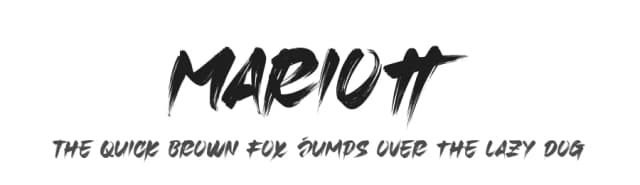
Imagine designing the logo and label packaging for a small batch tea company or a boutique candle line: that's where Mariott, from Omotu Studio, makes an immediate impression. This all-caps display brush font brings hand-drawn energy to projects that demand personality and authentic character. The organic, playful strokes capture that genuine handmade quality that carefully polished typefaces often fail to deliver.
Mariott performs beautifully on apparel designs, especially custom band tees and streetwear graphics where bold, hand-lettered appeal matters most. It works equally well for wedding invitation suites, small business product packaging, and editorial design where a strong headline voice becomes essential. You'll also reach for it when designing social media graphics, poster layouts, and book covers that need genuine stopping power. The font includes all uppercase letters, numerals, punctuation marks, and a full set of ligatures, with OpenType support across the Adobe Creative Suite (Illustrator, Photoshop, InDesign), Corel Draw, and Microsoft Word.
Multilingual support means you can extend the font across different writing systems. At large display sizes, the brush texture and character detail stay legible and visually engaging no matter the application. Grab Mariott on Creative Fabrica to add this hand-drawn workhorse to your professional typography toolkit.
Style & Use Cases
- Overall Style
- Eye-catching, Bold
- Use Case
- Headlines, Logos
- Ideal For
- posters, branding, and social media graphics
- Pairs With
- a readable sans or serif for body
How to Install Mariott Font
Step-by-step instructions for every platform
- 1Download the Mariott font file (.ttf or .otf).
- 2Locate the downloaded file in your Downloads folder.
- 3Right-click the font file.
- 4Select "Install" to install for the current user, or "Install for all users" to make it available system-wide.
- 5Mariott is now available in Word, Photoshop, Illustrator, and all other apps.
More by Omotu Studio
View all →
More Display Fonts
Browse all →







What pairs well with Mariott Font?
Mariott Font is a display font that shines as a display or heading face. Pair it with a clean sans-serif or serif font for body text — the contrast creates a clear hierarchy while the two styles stay balanced and easy to read.



Mariott Font
by Omotu Studio
Reviewed by the FontBoxDL team · Updated June 2026