
 1 / 10
About TA Modern Times Font
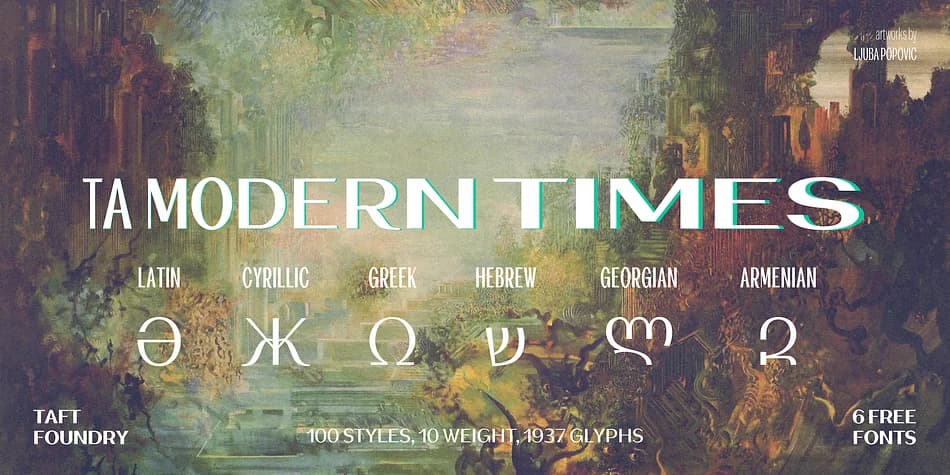
TA Modern Times by TAFT Foundry is a decorative typeface built for designs that need both distinctive personality and genuine technical depth. Version 3 expanded the language support significantly, adding support for Khinalyg, Vietnamese, Georgian, and Armenian alphabets alongside Bulgarian and Serbian Cyrillic variants. If you work across multiple markets or with multilingual clients, this kind of coverage genuinely matters. The technical improvements go beyond languages, though. Enhanced OpenType functionality handles ligatures, fractions, superscript and subscript, contextual alternates, and access to more than a dozen stylistic sets, letting you handle variation without switching fonts. Refined anchor points tighten the kerning throughout the family, which becomes obvious at large display sizes and in luxury applications where letter spacing carries real visual weight.
The family comes in six distinct weights, giving you the range you actually need across magazine spreads, artisan skincare packaging, upscale restaurant menus, and hardcover book jacket designs where typography carries the story. Each weight pairs beautifully with the enhanced features, so you're getting a typeface with both personality and professional capability. Grab TA Modern Times from Creative Fabrica and start working with a typeface that's truly built to perform on projects that demand something more than generic decoration.
Style & Use Cases
- Overall Style
- Bold, Distinctive
- Use Case
- Headlines, Posters
- Ideal For
- logos, packaging, and standout titles
- Pairs With
- a neutral sans-serif
How to Install TA Modern Times Font
Step-by-step instructions for every platform
- 1Download the TA Modern Times font file (.ttf or .otf).
- 2Locate the downloaded file in your Downloads folder.
- 3Right-click the font file.
- 4Select "Install" to install for the current user, or "Install for all users" to make it available system-wide.
- 5TA Modern Times is now available in Word, Photoshop, Illustrator, and all other apps.
More by TAFT Foundry
View all →

More Decorative Fonts
Browse all →






What pairs well with TA Modern Times Font?
TA Modern Times Font is a decorative font that shines as a display or heading face. Pair it with a clean sans-serif or serif font for body text — the contrast creates a clear hierarchy while the two styles stay balanced and easy to read.



TA Modern Times Font
by TAFT Foundry
Reviewed by the FontBoxDL team · Updated June 2026