 Firefox

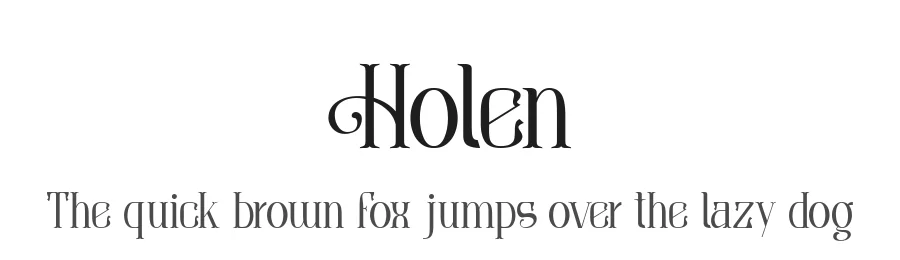 1 / 3
Loading font…
About Holen Font
Holen is a display typeface from Alit Design, designed by I Made Dwi Putra Yoga. This is a face built for moments when typography becomes the centerpiece of a design, commanding attention through its letterforms rather than relying on subtle refinement. Supporting 107+ Latin-based languages, it can anchor international projects without losing its voice or consistency across markets and cultural boundaries.
Display typefaces exist for a specific purpose: they step forward where body text recedes, creating visual anchors that pull focus and stop the viewer immediately. You'd reach for Holen when you need real typographic impact, whether designing boutique skincare packaging, wedding invitation suites, limited-edition record sleeves, or DIY craft signage where the face itself becomes part of the message. Its broad multilingual range means the same visual voice carries across international projects and regions with equal presence and personality, keeping visual consistency when you're working across borders and languages.
Pair Holen with a quiet, neutral sans-serif for body text and supporting elements, creating clear hierarchy that lets the display face command attention while keeping readers grounded and moving through your layout. The free personal-use demo is available here on our site, with the full commercial license available on Creative Fabrica.
Style & Use Cases
- Overall Style
- Eye-catching, Bold, Display
- Use Case
- Headlines, Logos
- Ideal For
- posters, branding, and social media graphics
- Pairs With
- a readable sans or serif for body
Holen Specifications
| Font Family | HOLEN |
| Style | Regular |
| Full Name | HOLEN Regular |
| Version | 1.000 |
| Weight | 400 (Regular) |
| Glyph Count | 148 glyphs |
| PostScript Name | HOLEN-Regular |
| Designer | I Made Dwi Putra Yoga |
| Format | TTF (TrueType) |
| File Size | 47.2 KB |
OpenType Features
Holen ships with 1 OpenType feature you can switch on in apps that support them (Illustrator, InDesign, Affinity, Figma, CSS font-feature-settings).
- Discretionary ligatures
Languages Supported
Holen supports 107 languages.
How to Install Holen Font
Step-by-step instructions for every platform
- 1Download the Holen font file (.ttf or .otf).
- 2Locate the downloaded file in your Downloads folder.
- 3Right-click the font file.
- 4Select "Install" to install for the current user, or "Install for all users" to make it available system-wide.
- 5Holen is now available in Word, Photoshop, Illustrator, and all other apps.
More by I Made Dwi Putra Yoga
View all →
Browse fonts by theme
Curated collections →Saw a font in a picture? Identify any font from an image with our free Font Finder.
More Display Fonts
Browse all →







What pairs well with Holen Font?
Holen Font is a display font that shines as a display or heading face. Pair it with a clean sans-serif or serif font for body text — the contrast creates a clear hierarchy while the two styles stay balanced and easy to read.




Holen Font
Reviewed by the FontBoxDL team · Updated August 2026