 Firefox
 1 / 7
1 / 7About GARDENS Font
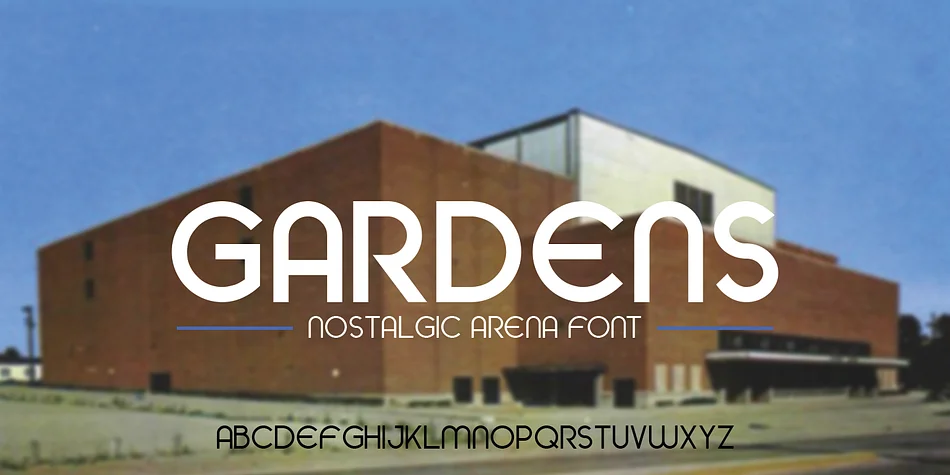
There's something unmistakably nostalgic about GARDENS, a display typeface from The Rivertown Inkery that channels the energy of mid-century athletic design. Inspired by the storied Cincinnati Gardens arena, this font family taps into that golden-era sports sensibility with real stylistic range. You get seven distinct weights in the package: Thin, Light, Regular, Medium, Bold, plus Outline and Inline versions that work brilliantly for layering effects and visual hierarchy. That combination of weights gives you genuine flexibility for both single-weight headlines and dimensional compositions.
The retro aesthetic makes this font ideal for vintage sports bar branding, old-school athletic event poster design, custom team jersey lettering, and nostalgic merchandise packaging. Because you have multiple weights at your disposal, you can anchor headlines with Bold while using Outline for decorative accents underneath. The Inline version opens up even more creative possibilities for depth and visual interest. Pair GARDENS with a clean, straightforward sans-serif like Inter or Rubik for any body text to maintain readability while the retro character still shines through your display applications.
If you gravitate toward letterforms that feel grounded in actual design history rather than modern templates, GARDENS belongs in your toolkit. Grab it from Creative Fabrica and let vintage energy do the heavy lifting in your next project.
Style & Use Cases
- Overall Style
- Eye-catching, Bold
- Use Case
- Headlines, Logos
- Ideal For
- posters, branding, and social media graphics
- Pairs With
- a readable sans or serif for body
How to Install GARDENS Font
Step-by-step instructions for every platform
- 1Download the GARDENS font file (.ttf or .otf).
- 2Locate the downloaded file in your Downloads folder.
- 3Right-click the font file.
- 4Select "Install" to install for the current user, or "Install for all users" to make it available system-wide.
- 5GARDENS is now available in Word, Photoshop, Illustrator, and all other apps.
More by The Rivertown Inkery
View all →
Browse fonts by theme
Curated collections →Saw a font in a picture? Identify any font from an image with our free Font Finder.
More Display Fonts
Browse all →







What pairs well with GARDENS Font?
GARDENS Font is a display font that shines as a display or heading face. Pair it with a clean sans-serif or serif font for body text — the contrast creates a clear hierarchy while the two styles stay balanced and easy to read.




GARDENS Font
Reviewed by the FontBoxDL team · Updated October 2026