 Firefox

 1 / 3
Loading font…
About Gabato Font
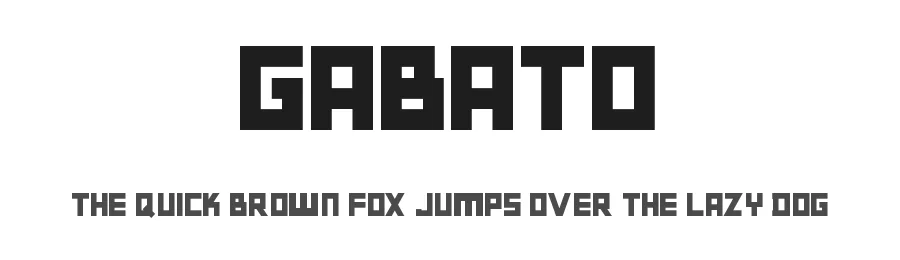
Gabato is a display typeface in normal weight, designed to command attention in headlines and prominent page positions. With 236 glyphs and support for over 209 Latin-based languages, this font opens doors to international design work without compromising its visual impact or distinctive character.
The design shines in applications where size and scale matter most. Wedding invitation headers benefit from Gabato's commanding presence, as do event posters, social media graphics, and Cricut vinyl decal projects. Small business owners frequently reach for display fonts like this to create eye-catching shopping banners and product labels. The broad language support means you can deploy it confidently across multiple markets without swapping typefaces mid-project, making it particularly valuable for agencies and designers working with diverse client bases.
For maximum effectiveness, pair Gabato with a clean, understated sans serif for body text. This approach gives your layouts breathing room while letting the display weight earn its spotlight in headlines and calls to action. Free for both personal and commercial use, Gabato removes licensing constraints from your creative process. Its straightforward normal weight keeps it practical rather than ornamental, making it a suitable choice for brands that value clarity and visual strength equally.
Style & Use Cases
- Overall Style
- Eye-catching, Bold, Display
- Use Case
- Headlines, Logos
- Ideal For
- posters, branding, and social media graphics
- Pairs With
- a readable sans or serif for body
Gabato Specifications
| Font Family | Gabato |
| Style | Normal |
| Full Name | Gabato |
| Version | 1.00 July 15, 2017, initial release |
| Weight | 400 (Regular) |
| Glyph Count | 236 glyphs |
| PostScript Name | Gabato |
| Format | TTF (TrueType) |
| File Size | 9.2 KB |
Languages Supported
Gabato supports 209 languages.
How to Install Gabato Font
Step-by-step instructions for every platform
- 1Download the Gabato font file (.ttf or .otf).
- 2Locate the downloaded file in your Downloads folder.
- 3Right-click the font file.
- 4Select "Install" to install for the current user, or "Install for all users" to make it available system-wide.
- 5Gabato is now available in Word, Photoshop, Illustrator, and all other apps.
Browse fonts by theme
Curated collections →Saw a font in a picture? Identify any font from an image with our free Font Finder.
More Display Fonts
Browse all →







What pairs well with Gabato Font?
Gabato Font is a display font that shines as a display or heading face. Pair it with a clean sans-serif or serif font for body text — the contrast creates a clear hierarchy while the two styles stay balanced and easy to read.




Premium Display Fonts
★ PremiumWant something with more weights, glyphs, and commercial polish? These premium display fonts are worth a look.




Gabato Font
Reviewed by the FontBoxDL team · Updated October 2026