 Firefox

 1 / 3
Loading font…
About FrancoFont 20 Font
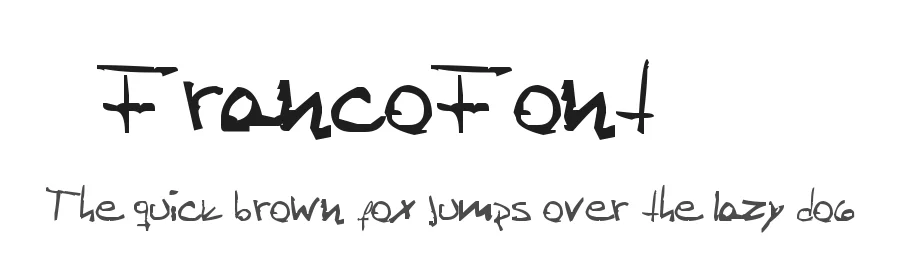
FrancoFont 20 is a display typeface designed with children's projects and young creative audiences in mind. Boasting 237 glyphs and support for 209+ Latin-based languages, this font delivers the comprehensive multilingual coverage essential for reaching global audiences in children's publishing and educational contexts. From picture book titles and classroom posters to educational worksheets and activity pages, it brings a playful, legible presence that engages young readers without sacrificing clarity or charm.
The font works beautifully across multiple children's publishing projects and formats. Whether designing toy and children's brand packaging, creating personalized birthday invitations and illustrated greeting cards, crafting Etsy shop banners for parents and educators, or cutting vinyl decal designs for Cricut machines, this typeface consistently delivers strong visual results. Its broad language support and friendly letterforms ensure reliable performance across print, digital, and craft applications for any multilingual audience.
This typeface is available free for personal use only, with commercial licenses available directly from the designer. FrancoFont 20 performs best in child-focused projects where a welcoming display font can serve as the visual anchor and spark imagination in young audiences.
Style & Use Cases
- Overall Style
- Eye-catching, Bold, Kids
- Use Case
- Headlines, Logos
- Ideal For
- posters, branding, and social media graphics
- Pairs With
- a readable sans or serif for body
FrancoFont 20 Specifications
| Font Family | FrancoFont 2.0 |
| Style | Normal |
| Full Name | FrancoFont 2.0 |
| Version | 1.00 June 10, 2010, initial release |
| Weight | 400 (Regular) |
| Glyph Count | 237 glyphs |
| PostScript Name | FrancoFont2.0 |
| Format | TTF (TrueType) |
| File Size | 15 KB |
Languages Supported
FrancoFont 20 supports 209 languages.
How to Install FrancoFont 20 Font
Step-by-step instructions for every platform
- 1Download the FrancoFont 20 font file (.ttf or .otf).
- 2Locate the downloaded file in your Downloads folder.
- 3Right-click the font file.
- 4Select "Install" to install for the current user, or "Install for all users" to make it available system-wide.
- 5FrancoFont 20 is now available in Word, Photoshop, Illustrator, and all other apps.
Browse fonts by theme
Curated collections →Saw a font in a picture? Identify any font from an image with our free Font Finder.
More Display Fonts
Browse all →







What pairs well with FrancoFont 20 Font?
FrancoFont 20 Font is a display font that shines as a display or heading face. Pair it with a clean sans-serif or serif font for body text — the contrast creates a clear hierarchy while the two styles stay balanced and easy to read.




Premium Display Fonts
★ PremiumWant something with more weights, glyphs, and commercial polish? These premium display fonts are worth a look.




FrancoFont 20 Font
Reviewed by the FontBoxDL team · Updated October 2026
License: Free for personal use