
 1 / 9
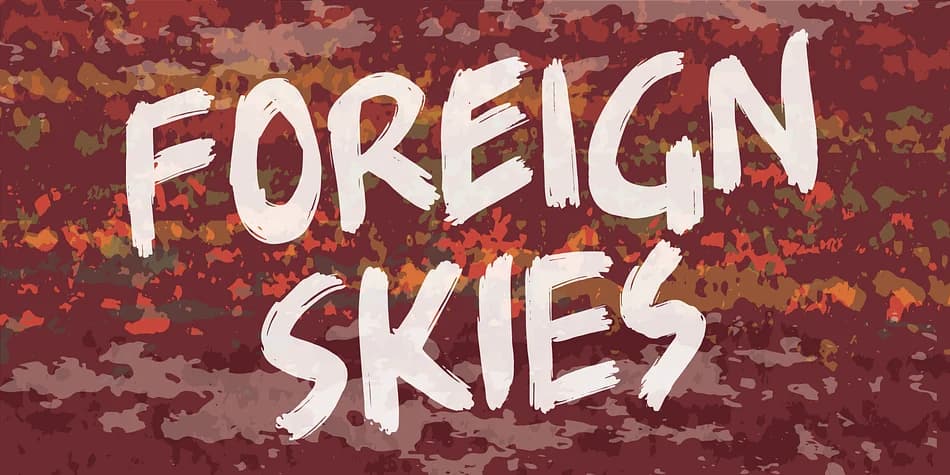
1 / 9About Foreign Skies Font
Foreign Skies is that hastily written brush font you’re going to need, if you’re looking for an authentic brush font. I am aware that Foreign Skies doesn’t always meet the criteria of a professional signletteres demands of “perfect strokes” - but that is the basic idea! It is super legible, even at small sizes, but at the same time it is uneven, bouncy, clumsy and rough!
How to Install Foreign Skies Font
Step-by-step instructions for every platform
- 1Download the Foreign Skies font file (.ttf or .otf).
- 2Locate the downloaded file in your Downloads folder.
- 3Right-click the font file.
- 4Select "Install" to install for the current user, or "Install for all users" to make it available system-wide.
- 5Foreign Skies is now available in Word, Photoshop, Illustrator, and all other apps.
More by Pizzadude.dk
View all →



More Display Fonts
Browse all →







What pairs well with Foreign Skies Font?
Foreign Skies Font is a display font that shines as a display or heading face. Pair it with a clean sans-serif or serif font for body text — the contrast creates a clear hierarchy while the two styles stay balanced and easy to read.


Foreign Skies Font
by Pizzadude.dk
Reviewed by the FontBoxDL team · Updated April 2026
License: Worry-Free
$16.00