 Firefox

 1 / 3
Loading font…
About FolksInCube Font
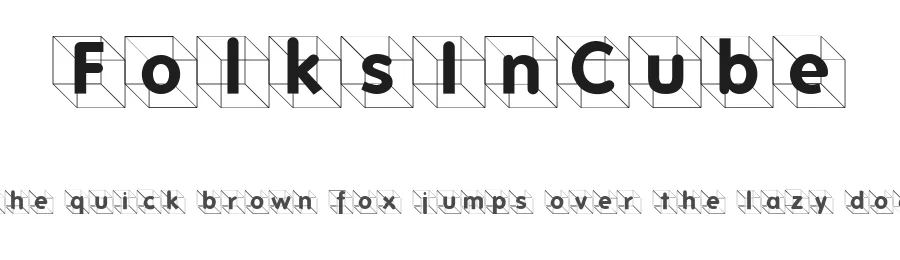
FolksInCube is a display typeface designed with a playful, kid-centric personality that brings character and genuine warmth to creative projects. With 209 glyphs and comprehensive support for 207+ Latin-based languages, it opens doors to international work while maintaining its distinctive visual voice consistently across scripts and regions. The regular weight is engineered for crisp, confident readability at display sizes, making it equally strong at large scales or when reduced for secondary use.
This font genuinely excels in children's book covers, toy packaging designs, and illustrated birthday party invitations where design personality outweighs formality. Etsy shop banners promoting kids' crafts, educational posters, and learning materials find natural homes here, as do YouTube thumbnails and playroom wall decals designed to catch young eyes. The approachable, engaging letterforms work beautifully in school announcements, camp notices, and any illustrated project where type should feel friendly and engaging rather than corporate or serious.
Pair FolksInCube with a clean sans-serif or serif font for body text to let its display character truly stand out without overwhelming supporting copy or compromising legibility. The font is available free for personal use, with commercial licenses available directly from the designer.
Style & Use Cases
- Overall Style
- Eye-catching, Bold, Kids
- Use Case
- Headlines, Logos
- Ideal For
- posters, branding, and social media graphics
- Pairs With
- a readable sans or serif for body
FolksInCube Specifications
| Font Family | FolksInCube |
| Style | Regular |
| Full Name | FolksInCube |
| Version | 1.0 2004-10-15 |
| Weight | 500 (Medium) |
| Glyph Count | 209 glyphs |
| PostScript Name | FolksInCube |
| Format | TTF (TrueType) |
| File Size | 53.9 KB |
Languages Supported
FolksInCube supports 207 languages.
How to Install FolksInCube Font
Step-by-step instructions for every platform
- 1Download the FolksInCube font file (.ttf or .otf).
- 2Locate the downloaded file in your Downloads folder.
- 3Right-click the font file.
- 4Select "Install" to install for the current user, or "Install for all users" to make it available system-wide.
- 5FolksInCube is now available in Word, Photoshop, Illustrator, and all other apps.
Browse fonts by theme
Curated collections →Saw a font in a picture? Identify any font from an image with our free Font Finder.
More Display Fonts
Browse all →







What pairs well with FolksInCube Font?
FolksInCube Font is a display font that shines as a display or heading face. Pair it with a clean sans-serif or serif font for body text — the contrast creates a clear hierarchy while the two styles stay balanced and easy to read.




Premium Display Fonts
★ PremiumWant something with more weights, glyphs, and commercial polish? These premium display fonts are worth a look.




FolksInCube Font
Reviewed by the FontBoxDL team · Updated October 2026
License: Free for personal use