 Firefox
 1 / 10
About FLORA Font
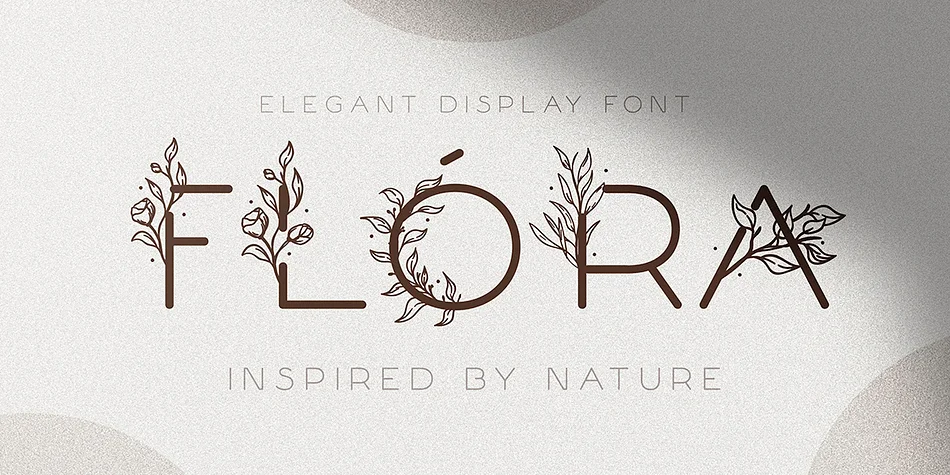
You're working on an upscale wedding invitation suite and you need something with genuine personality but without ornamental excess. FLORA by Andrew Pixel delivers exactly this balance. The typeface bridges decorative display work and functional headline use, letting it handle both roles without sliding into the fussy territory that dates quickly.
This font shines in specific applications: wedding invitation suites, natural product packaging for boutique skincare brands, flower shop branding and signage, and lifestyle social media graphics where visual restraint actually strengthens the message. Etsy sellers packaging handmade goods will find real utility here, and it brings the right presence to event stationery without compromising legibility. The basic multilingual glyph support extends your reach to international client work without hunting for alternatives.
Both OTF and TTF formats ship with the download, keeping your workflow straightforward across design tools and web projects. What makes FLORA genuinely useful is how the letterforms maintain their presence and readability when set at larger display sizes, where weaker display faces often turn cramped or awkward. Get it on Creative Fabrica and add it to your working collection.
Style & Use Cases
- Overall Style
- Eye-catching, Bold
- Use Case
- Headlines, Logos
- Ideal For
- posters, branding, and social media graphics
- Pairs With
- a readable sans or serif for body
How to Install FLORA Font
Step-by-step instructions for every platform
- 1Download the FLORA font file (.ttf or .otf).
- 2Locate the downloaded file in your Downloads folder.
- 3Right-click the font file.
- 4Select "Install" to install for the current user, or "Install for all users" to make it available system-wide.
- 5FLORA is now available in Word, Photoshop, Illustrator, and all other apps.
More by Andrew Pixel
View all →
Browse fonts by theme
Curated collections →Saw a font in a picture? Identify any font from an image with our free Font Finder.
More Display Fonts
Browse all →







What pairs well with FLORA Font?
FLORA Font is a display font that shines as a display or heading face. Pair it with a clean sans-serif or serif font for body text — the contrast creates a clear hierarchy while the two styles stay balanced and easy to read.




FLORA Font
by Andrew Pixel
Reviewed by the FontBoxDL team · Updated September 2026