 Firefox
 1 / 10
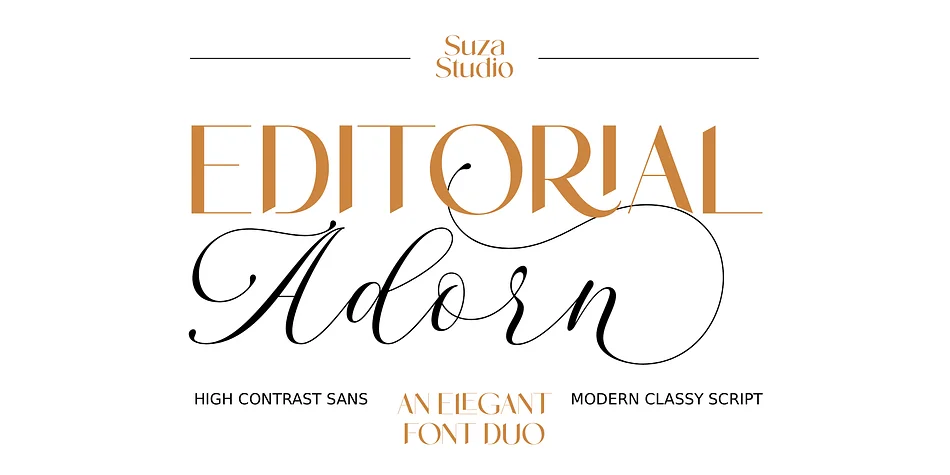
About Editorial Adorn Font
Editorial Adorn strikes that rare balance between nostalgic character and refined elegance. Created by Suza Studio, this display font weaves script and sans serif elements together, delivering both warmth and sophistication in a single, versatile typeface.
The font excels for wedding invitation suites, editorial magazine spreads, boutique skincare and artisan product packaging, and high-end brand identity work where personality and intentionality matter most. In headlines, decorative elements, or across full-page displays, it brings dimensional, tactile character that reads as curated rather than templated. Supporting English, Italian, French, Spanish, German, Portuguese, Dutch, Danish, Norwegian, and Swedish, the font also includes ligatures and alternate characters housed in PUA-encoded space, accessible without any special software. Complete punctuation and numeral sets come built in, giving you everything you need for polished, multilingual projects.
Pair Editorial Adorn with a clean, modern sans serif for body copy to let it anchor your layouts and draw focus where it matters most. The contrast between its textured character and spare geometry creates natural reading hierarchy. Find it on Creative Fabrica and strengthen your typographic toolkit with a display face that earns its place.
Style & Use Cases
- Overall Style
- Eye-catching, Bold
- Use Case
- Headlines, Logos
- Ideal For
- posters, branding, and social media graphics
- Pairs With
- a readable sans or serif for body
How to Install Editorial Adorn Font
Step-by-step instructions for every platform
- 1Download the Editorial Adorn font file (.ttf or .otf).
- 2Locate the downloaded file in your Downloads folder.
- 3Right-click the font file.
- 4Select "Install" to install for the current user, or "Install for all users" to make it available system-wide.
- 5Editorial Adorn is now available in Word, Photoshop, Illustrator, and all other apps.
More by Suza Studio
View all →
Browse fonts by theme
Curated collections →Saw a font in a picture? Identify any font from an image with our free Font Finder.
More Display Fonts
Browse all →







What pairs well with Editorial Adorn Font?
Editorial Adorn Font is a display font that shines as a display or heading face. Pair it with a clean sans-serif or serif font for body text — the contrast creates a clear hierarchy while the two styles stay balanced and easy to read.




Editorial Adorn Font
by Suza Studio
Reviewed by the FontBoxDL team · Updated September 2026