 Firefox

 1 / 3
Loading font…
About darkmatter Font
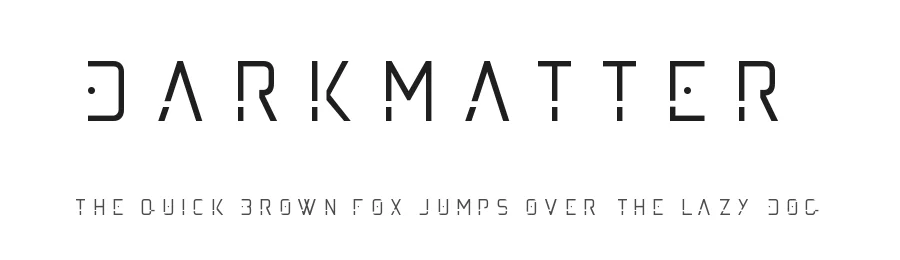
Darkmatter is a futuristic display font in Medium weight, crafted to deliver bold cosmic energy to striking typographic layouts. With 68 glyphs and support for 89+ Latin-based languages, it brings a sleek, space-age aesthetic to designs that demand immediate visual impact and communicate a distinctly modern sensibility.
This typeface excels in high-impact applications where contemporary, tech-forward design is not just preferred but essential. Science fiction book covers and movie posters benefit tremendously from its dramatic presence and forward-thinking character. Gaming studios rely on fonts with this futuristic edge for UI elements, title screens, and in-game graphics that immerse players in otherworldly digital environments. Tech startups frequently select display fonts like Darkmatter for website headers, promotional materials, and branding collateral that signals innovation and ambition. Musicians and independent creators turn to space-age typefaces for album artwork, music video thumbnails, and podcast cover art specifically designed to stand out on streaming platforms.
Free for personal use only, Darkmatter requires a commercial license from the designer for any commercial or professional applications. This typeface is best suited for projects where bold, forward-thinking typography needs to serve as the central visual element and primary focal point of the entire design system or layout.
Style & Use Cases
- Overall Style
- Eye-catching, Bold, Futuristic
- Use Case
- Headlines, Logos
- Ideal For
- posters, branding, and social media graphics
- Pairs With
- a readable sans or serif for body
darkmatter Specifications
| Font Family | darkmatter |
| Style | Medium |
| Full Name | darkmatter |
| Version | 001.000 |
| Weight | 500 (Medium) |
| Glyph Count | 68 glyphs |
| PostScript Name | darkmatter |
| Format | TTF (TrueType) |
| File Size | 9.4 KB |
Languages Supported
darkmatter supports 89 languages.
How to Install darkmatter Font
Step-by-step instructions for every platform
- 1Download the darkmatter font file (.ttf or .otf).
- 2Locate the downloaded file in your Downloads folder.
- 3Right-click the font file.
- 4Select "Install" to install for the current user, or "Install for all users" to make it available system-wide.
- 5darkmatter is now available in Word, Photoshop, Illustrator, and all other apps.
Browse fonts by theme
Curated collections →Saw a font in a picture? Identify any font from an image with our free Font Finder.
More Display Fonts
Browse all →







What pairs well with darkmatter Font?
darkmatter Font is a display font that shines as a display or heading face. Pair it with a clean sans-serif or serif font for body text — the contrast creates a clear hierarchy while the two styles stay balanced and easy to read.




Premium Display Fonts
★ PremiumWant something with more weights, glyphs, and commercial polish? These premium display fonts are worth a look.




darkmatter Font
Reviewed by the FontBoxDL team · Updated October 2026
License: Free for personal use