 Firefox

 1 / 3
Loading font…
About Crypo Font
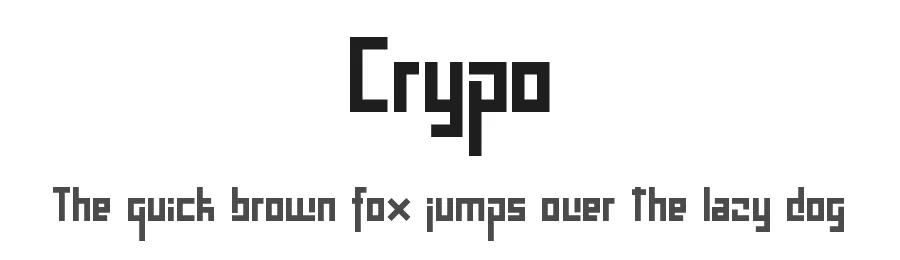
Crypo is a display typeface offering 98 glyphs and robust support for 109+ Latin-based languages, making it an accessible choice for global design projects. As a regular-weight display font, it delivers strong visual impact for headlines in print collateral, website headers, branding materials, and poster designs where both visual presence and legibility are essential. The character set spans enough territory to handle multilingual typesetting without any missing glyphs.
This language breadth opens possibilities for international campaigns, multilingual product packaging, event promotion materials, and global social media graphics. Designers working across markets can reach audiences in their native scripts without the need to source additional typefaces. For brand identity work that must function internationally, Crypo provides consistent visual language across regions and diverse media applications.
Licensed as free for personal and commercial use and downloadable directly from this page, Crypo removes any licensing concerns entirely. Projects ranging from book covers and event invitations to Etsy shop banners, vinyl decal designs, and app UI headers benefit from its clean, direct presentation. Choose this typeface when you need straightforward display power that performs reliably across languages and markets.
Style & Use Cases
- Overall Style
- Eye-catching, Bold, Display
- Use Case
- Headlines, Logos
- Ideal For
- posters, branding, and social media graphics
- Pairs With
- a readable sans or serif for body
Crypo Specifications
| Font Family | Crypo |
| Style | Regular |
| Full Name | CrypoRegular |
| Version | 1.0 |
| Weight | 400 (Regular) |
| Glyph Count | 98 glyphs |
| PostScript Name | Crypo |
| Format | TTF (TrueType) |
| File Size | 16 KB |
OpenType Features
Crypo ships with 1 OpenType feature you can switch on in apps that support them (Illustrator, InDesign, Affinity, Figma, CSS font-feature-settings).
- Contextual ligatures
Languages Supported
Crypo supports 109 languages.
How to Install Crypo Font
Step-by-step instructions for every platform
- 1Download the Crypo font file (.ttf or .otf).
- 2Locate the downloaded file in your Downloads folder.
- 3Right-click the font file.
- 4Select "Install" to install for the current user, or "Install for all users" to make it available system-wide.
- 5Crypo is now available in Word, Photoshop, Illustrator, and all other apps.
Browse fonts by theme
Curated collections →Saw a font in a picture? Identify any font from an image with our free Font Finder.
More Display Fonts
Browse all →







What pairs well with Crypo Font?
Crypo Font is a display font that shines as a display or heading face. Pair it with a clean sans-serif or serif font for body text — the contrast creates a clear hierarchy while the two styles stay balanced and easy to read.




Premium Display Fonts
★ PremiumWant something with more weights, glyphs, and commercial polish? These premium display fonts are worth a look.




Crypo Font
Reviewed by the FontBoxDL team · Updated October 2026