 Firefox

 1 / 3
Loading font…
About Broadcast Font
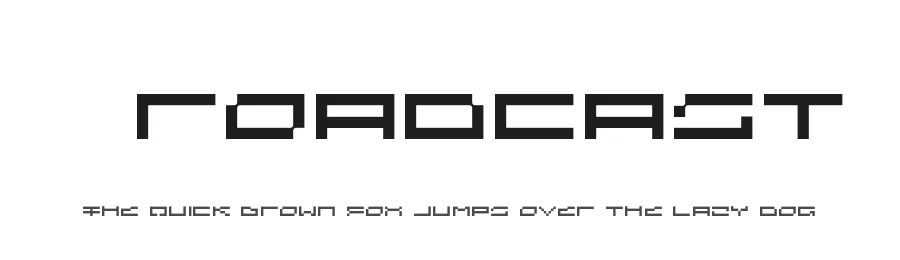
Broadcast is a display typeface from Aeriform, designed by Mıchael Chrıstophersson. This regular-weight font brings confident, bold character to high-impact projects with its collection of 75 glyphs and support for 104+ Latin-based languages.
Display fonts serve a specific purpose: they command attention where subtlety would be lost. Broadcast performs exceptionally in magazine covers and editorial layouts where headlines need stopping power. Podcast artwork gains personality and presence through its strong letterforms, as do social media graphics designed for platforms like Instagram, TikTok, and Pinterest. Event posters and concert promotion materials become impossible to ignore when set in Broadcast. Book cover designs, album artwork, and music playlist visualizers also benefit from its bold personality. The extensive language support means international campaigns, multilingual publications, and cross-cultural branding initiatives can rely on consistent typography without workarounds. Designers appreciate its breadth of character coverage for print projects, digital work, and promotional materials alike.
The font is free for personal and commercial use and is available directly from this page. When pairing Broadcast with supporting typography, consider a clean, neutral sans-serif or an elegant serif for body copy. This hierarchy allows the display font to retain its commanding presence while keeping longer text readable.
Style & Use Cases
- Overall Style
- Eye-catching, Bold, Display
- Use Case
- Headlines, Logos
- Ideal For
- posters, branding, and social media graphics
- Pairs With
- a readable sans or serif for body
Broadcast Specifications
| Font Family | Broadcast |
| Style | Regular |
| Full Name | Broadcast Regular |
| Version | 1.000 |
| Weight | 400 (Regular) |
| Glyph Count | 75 glyphs |
| PostScript Name | Broadcast-Regular |
| Designer | Mıchael Chrıstophersson |
| Format | OTF (CFF) |
| File Size | 4.2 KB |
Languages Supported
Broadcast supports 104 languages.
How to Install Broadcast Font
Step-by-step instructions for every platform
- 1Download the Broadcast font file (.ttf or .otf).
- 2Locate the downloaded file in your Downloads folder.
- 3Right-click the font file.
- 4Select "Install" to install for the current user, or "Install for all users" to make it available system-wide.
- 5Broadcast is now available in Word, Photoshop, Illustrator, and all other apps.
Browse fonts by theme
Curated collections →Saw a font in a picture? Identify any font from an image with our free Font Finder.
More Display Fonts
Browse all →







What pairs well with Broadcast Font?
Broadcast Font is a display font that shines as a display or heading face. Pair it with a clean sans-serif or serif font for body text — the contrast creates a clear hierarchy while the two styles stay balanced and easy to read.




Premium Display Fonts
★ PremiumWant something with more weights, glyphs, and commercial polish? These premium display fonts are worth a look.




Broadcast Font
Reviewed by the FontBoxDL team · Updated October 2026