 Firefox

 1 / 3
Loading font…
About Barbaro Font
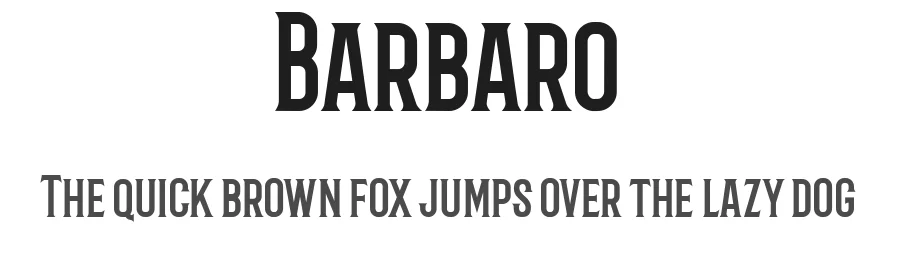
Barbaro is a display font in the Roman style, built to anchor headlines and draw focus to primary typographic elements. Featuring 105 glyphs and support for 126+ Latin-based languages across multiple regions, it handles international text with the same visual strength it brings to English typography. The Roman upright style delivers clean, authoritative letterforms that work across diverse design contexts with confident visual presence.
Deploy Barbaro for website hero sections where commanding typography matters, magazine covers requiring bold typographic treatments, poster headlines meant for multilingual readership, or brand identity systems where classical letterforms signal reliability and heritage. Because it covers such an expansive range of languages from a single font file, you avoid the jarring visual shifts that mismatched secondary typefaces introduce. Its glyph set of 105 characters balances completeness with practical restraint, making it genuinely useful rather than feature-bloated.
Free for personal and commercial use, Barbaro proves its value when you require a display font that performs across language boundaries. Reach for it instead of safer defaults when your specific design needs the weight, authority, and classical character that Roman display letterforms provide, especially in projects targeting multilingual audiences or building brands rooted in tradition and stability.
Style & Use Cases
- Overall Style
- Eye-catching, Bold, Display
- Use Case
- Headlines, Logos
- Ideal For
- posters, branding, and social media graphics
- Pairs With
- a readable sans or serif for body
Barbaro Specifications
| Font Family | Barbaro |
| Style | Roman |
| Full Name | Barbaro Roman |
| Weight | 400 (Regular) |
| Glyph Count | 105 glyphs |
| PostScript Name | Barbaro-Roman |
| Format | TTF (TrueType) |
| File Size | 37.2 KB |
Languages Supported
Barbaro supports 126 languages.
How to Install Barbaro Font
Step-by-step instructions for every platform
- 1Download the Barbaro font file (.ttf or .otf).
- 2Locate the downloaded file in your Downloads folder.
- 3Right-click the font file.
- 4Select "Install" to install for the current user, or "Install for all users" to make it available system-wide.
- 5Barbaro is now available in Word, Photoshop, Illustrator, and all other apps.
Browse fonts by theme
Curated collections →Saw a font in a picture? Identify any font from an image with our free Font Finder.
More Display Fonts
Browse all →







What pairs well with Barbaro Font?
Barbaro Font is a display font that shines as a display or heading face. Pair it with a clean sans-serif or serif font for body text — the contrast creates a clear hierarchy while the two styles stay balanced and easy to read.




Premium Display Fonts
★ PremiumWant something with more weights, glyphs, and commercial polish? These premium display fonts are worth a look.




Barbaro Font
Reviewed by the FontBoxDL team · Updated October 2026