 Firefox

 1 / 3
Loading font…
About Arima Font
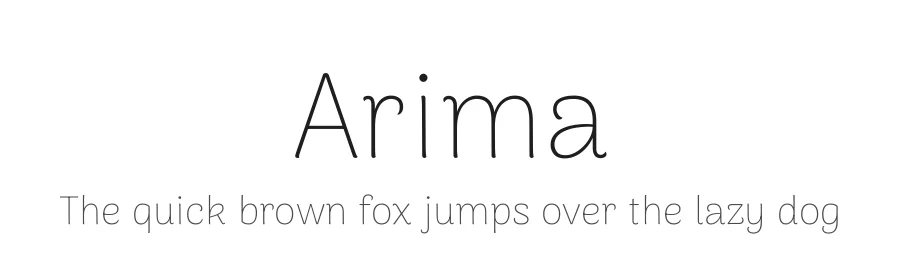
A display font with soft edges and calligraphic feel is the main inspiration for Arima project. It has a low contrast to allow good rendering on screen. Legibility is always a central concern, but the design has a lot of personality to be recognizable as a display font to be used in headlines, brand names, and similar uses on the web. The primary goal was to create a design that will prove popular because it resonates with both casual and professional designers, and without ever lowering the quality of the design. Each font in the family was extensively tested on low resolution phones and refined to work well as a web font in the mobile era. From the very first round of design testing, each font was hinted with ttfautohint and refined for Windows users. Arima Madurai has an extended language support for the Tamil and Latin scripts, as well as Malayalam and Greek. Greek developed during Google Summer of Code 2017 by Rosalie Wagner, under the mentorship of Emilios Theofanous and Irene Vlachou." The Arima project is led by NDISCOVER, a type design foundry based in Portugal. To contribute, see github.com/NDISCOVER/Arima-Font
Style & Use Cases
- Overall Style
- Ultra-light, Eye-catching, Bold, Display
- Use Case
- Headlines, Logos
- Ideal For
- posters, branding, and social media graphics
- Pairs With
- a readable sans or serif for body
Arima Specifications
| Font Family | Arima Thin |
| Style | Regular |
| Full Name | Arima Thin |
| Version | 1.101 |
| Weight | 100 (Thin) |
| Glyph Count | 1393 glyphs |
| PostScript Name | Arima-Thin |
| Designer | Joana Correia and Natanael Gama |
| Format | TTF (TrueType) |
| File Size | 340.3 KB |
OpenType Features
Arima ships with 8 OpenType features you can switch on in apps that support them (Illustrator, InDesign, Affinity, Figma, CSS font-feature-settings).
- Case-sensitive forms
- Fractions
- Standard ligatures
- Ordinals
- Scientific inferiors
- Subscripts
- Superscripts
- Stylistic sets (3)
- Variable font · axes: wght
Languages Supported
Arima supports 318 languages.
How to Install Arima Font
Step-by-step instructions for every platform
- 1Download the Arima font file (.ttf or .otf).
- 2Locate the downloaded file in your Downloads folder.
- 3Right-click the font file.
- 4Select "Install" to install for the current user, or "Install for all users" to make it available system-wide.
- 5Arima is now available in Word, Photoshop, Illustrator, and all other apps.
Browse fonts by theme
Curated collections →Saw a font in a picture? Identify any font from an image with our free Font Finder.
More Display Fonts
Browse all →







What pairs well with Arima Font?
Arima Font is a display font that shines as a display or heading face. Pair it with a clean sans-serif or serif font for body text — the contrast creates a clear hierarchy while the two styles stay balanced and easy to read.




Premium Display Fonts
★ PremiumWant something with more weights, glyphs, and commercial polish? These premium display fonts are worth a look.




Arima Font
by Natanael Gama, Joana Correia, Rosalie Wagner
Reviewed by the FontBoxDL team · Updated July 2026