 Firefox

 1 / 3
Loading font…
About Appears Font
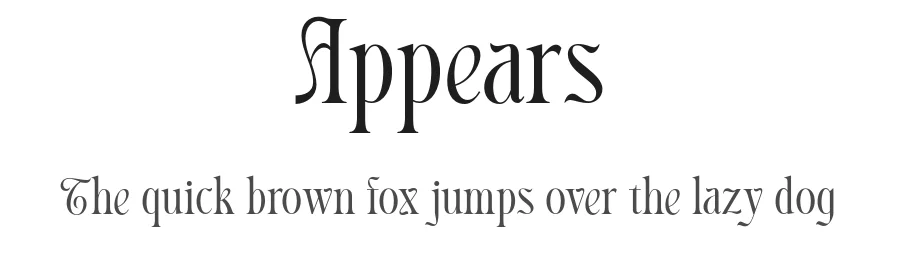
Picture a magazine spread, event poster, or book cover that needs to command real attention from across the room. Appears is a display typeface engineered specifically for those high-impact moments when headlines, cover text, and large-format typography demand presence alongside clear, confident readability. The Regular weight delivers clean, assured letterforms that perform reliably across 104+ Latin-based languages, making it genuinely versatile for international branding projects, global product launches, multilingual campaigns, and any work that spans multiple language audiences without compromise.
This is the kind of font that excels for magazine cover headlines, book title pages, boutique storefront signage, and album cover lettering. The straightforward design sidesteps ornamental fuss and decorative flourishes, letting your content communicate first while the typeface provides solid visual backbone and structural presence. At display sizes (48pt and larger), Appears maintains excellent clarity and sharpness without becoming precious or overwrought. It handles the demands of posters, packaging headers, website hero sections, print collateral, and any format where bold text needs to shine.
You can try Appears free on fontboxdl.com for personal work and see how it performs in your projects. The full commercial version is available through Creative Fabrica, unlocking professional applications for client projects, commercial products, packaging work, and comprehensive brand identity development.
Style & Use Cases
- Overall Style
- Eye-catching, Bold, Display
- Use Case
- Headlines, Logos
- Ideal For
- posters, branding, and social media graphics
- Pairs With
- a readable sans or serif for body
Appears Specifications
| Font Family | Appears DEMO |
| Style | Regular |
| Full Name | Appears DEMO Regular |
| Version | 1.000 |
| Weight | 400 (Regular) |
| Glyph Count | 90 glyphs |
| PostScript Name | AppearsDEMO-Regular |
| Format | OTF (CFF) |
| File Size | 20.2 KB |
Languages Supported
Appears supports 104 languages.
How to Install Appears Font
Step-by-step instructions for every platform
- 1Download the Appears font file (.ttf or .otf).
- 2Locate the downloaded file in your Downloads folder.
- 3Right-click the font file.
- 4Select "Install" to install for the current user, or "Install for all users" to make it available system-wide.
- 5Appears is now available in Word, Photoshop, Illustrator, and all other apps.
Browse fonts by theme
Curated collections →Saw a font in a picture? Identify any font from an image with our free Font Finder.
More Display Fonts
Browse all →







What pairs well with Appears Font?
Appears Font is a display font that shines as a display or heading face. Pair it with a clean sans-serif or serif font for body text — the contrast creates a clear hierarchy while the two styles stay balanced and easy to read.




Appears Font
Reviewed by the FontBoxDL team · Updated August 2026