 Firefox

 1 / 3
Loading font…
About Anta Font
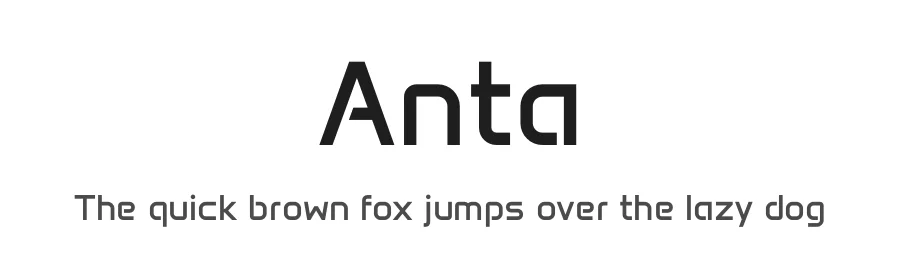
Anta is a display typeface designed by Sergej Lebedev. Created as a Regular weight with 404 glyphs, it covers 296+ Latin-based languages, making it accessible for genuinely international work. The font performs well when you need typography to command attention: think social media graphics and branded social posts, magazine covers and editorial posters, app interfaces and digital product headers, and branding materials for creative studios and design agencies. Display fonts like Anta are built for one job: to grab focus on the page without overwhelming the surrounding content.
Its broad character set and multi-language support make it a practical choice for designers working across regions or building cohesive brands that need to reach audiences worldwide. The Regular weight maintains legibility even at large scale, a critical advantage for display-size typography. This font is free for personal and commercial use, available for download from this page, removing cost as any barrier to incorporating it into professional work.
Choose Anta when you need a display font with genuine international language coverage and don't want to sacrifice glyph completeness. Many display typefaces narrow themselves to basic Latin characters, but Anta's comprehensive set means you can rely on it for multilingual campaigns without switching fonts mid-project or hunting for workarounds.
Style & Use Cases
- Overall Style
- Eye-catching, Bold, Display
- Use Case
- Headlines, Logos
- Ideal For
- posters, branding, and social media graphics
- Pairs With
- a readable sans or serif for body
Anta Specifications
| Font Family | Anta |
| Style | Regular |
| Full Name | Anta Regular |
| Version | 1.000 |
| Weight | 400 (Regular) |
| Glyph Count | 404 glyphs |
| PostScript Name | Anta-Regular |
| Designer | Sergej Lebedev |
| Format | OTF (CFF) |
| File Size | 28.9 KB |
OpenType Features
Anta ships with 5 OpenType features you can switch on in apps that support them (Illustrator, InDesign, Affinity, Figma, CSS font-feature-settings).
- Case-sensitive forms
- Fractions
- Standard ligatures
- Ordinals
- Superscripts
Languages Supported
Anta supports 296 languages.
How to Install Anta Font
Step-by-step instructions for every platform
- 1Download the Anta font file (.ttf or .otf).
- 2Locate the downloaded file in your Downloads folder.
- 3Right-click the font file.
- 4Select "Install" to install for the current user, or "Install for all users" to make it available system-wide.
- 5Anta is now available in Word, Photoshop, Illustrator, and all other apps.
Browse fonts by theme
Curated collections →Saw a font in a picture? Identify any font from an image with our free Font Finder.
More Display Fonts
Browse all →







What pairs well with Anta Font?
Anta Font is a display font that shines as a display or heading face. Pair it with a clean sans-serif or serif font for body text — the contrast creates a clear hierarchy while the two styles stay balanced and easy to read.




Premium Display Fonts
★ PremiumWant something with more weights, glyphs, and commercial polish? These premium display fonts are worth a look.




Anta Font
Reviewed by the FontBoxDL team · Updated October 2026