 Firefox

 1 / 3
Loading font…
About Amhole SW Font
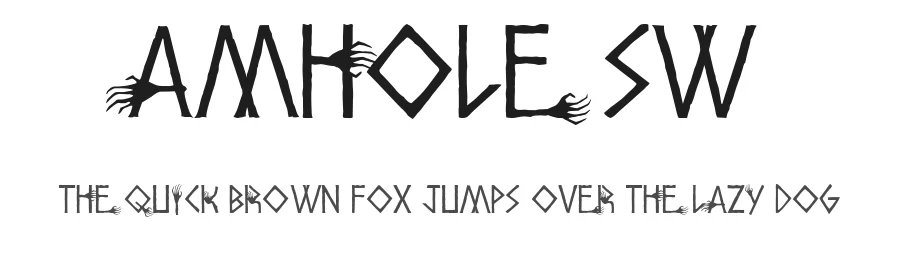
Amhole SW is a display typeface with a commanding visual presence and strong character that demands attention. With 109 glyphs and support for 104+ Latin-based languages, this font delivers considerable typographic personality for headline work. The Halloween classification signals its core aesthetic: it carries a distinctly darker, spookier sensibility that resonates with seasonal, horror-themed, and atmospheric creative projects. As a display font, it functions best as a headline, title, or prominent accent element rather than body text, allowing its character to shine on large formats.
This typeface excels across multiple project contexts: Halloween party invitations and costume event announcements, atmospheric social media graphics for October seasonal campaigns, striking promotional posters for haunted attractions or horror films, and eye-catching banners for event advertising. Designers creating Etsy shop banners, Cricut vinyl projects, or print collateral will find its bold, distinctive presence particularly effective for standing out. The extensive Latin language support means you can confidently apply it to multilingual designs without character limitations.
It's free for personal use, though commercial projects require a license from the designer. Its bold, commanding nature suits projects that embrace darker themes, seasonal aesthetics, or designs where visual impact and character take priority over subtlety.
Style & Use Cases
- Overall Style
- Eye-catching, Bold, Halloween
- Use Case
- Headlines, Logos
- Ideal For
- posters, branding, and social media graphics
- Pairs With
- a readable sans or serif for body
Amhole SW Specifications
| Font Family | Amhole |
| Style | SW |
| Full Name | Amhole SW |
| Version | Macromedia Fontographer 4.1.5 10/2/01 |
| Weight | 400 (Regular) |
| Glyph Count | 109 glyphs |
| PostScript Name | AmholeSW |
| Format | TTF (TrueType) |
| File Size | 207.8 KB |
Languages Supported
Amhole SW supports 104 languages.
How to Install Amhole SW Font
Step-by-step instructions for every platform
- 1Download the Amhole SW font file (.ttf or .otf).
- 2Locate the downloaded file in your Downloads folder.
- 3Right-click the font file.
- 4Select "Install" to install for the current user, or "Install for all users" to make it available system-wide.
- 5Amhole SW is now available in Word, Photoshop, Illustrator, and all other apps.
Browse fonts by theme
Curated collections →Saw a font in a picture? Identify any font from an image with our free Font Finder.
More Display Fonts
Browse all →







What pairs well with Amhole SW Font?
Amhole SW Font is a display font that shines as a display or heading face. Pair it with a clean sans-serif or serif font for body text — the contrast creates a clear hierarchy while the two styles stay balanced and easy to read.




Premium Display Fonts
★ PremiumWant something with more weights, glyphs, and commercial polish? These premium display fonts are worth a look.




Amhole SW Font
Reviewed by the FontBoxDL team · Updated October 2026
License: Free for personal use