 Firefox

 1 / 3
Loading font…
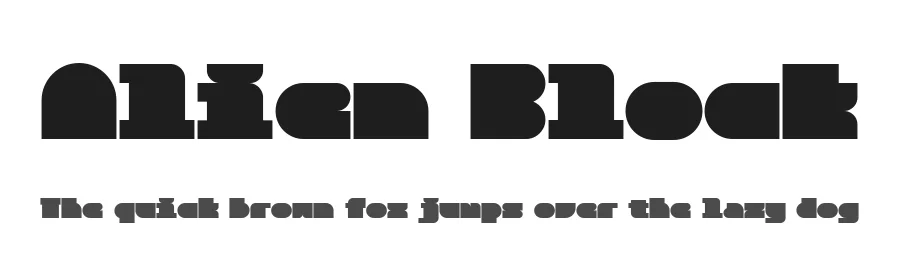
About Alien Block Font
Alien Block is a structural display typeface that treats typography as architecture. Born from an exploration of modularity, it bridges the gap between the rigid logic of a grid and the expressive needs of modern graphic design. At its core, Alien Block is built on a shared modular unit, allowing characters to stack and align like architectural tiles. This systematic approach creates a distinctive visual rhythm, making it an ideal choice for logos, headlines, and experimental layouts. It is particularly effective when used in "block" compositions, where the relationship between positive and negative space becomes as important as the letters themselves. Whether you are designing a futuristic poster or a minimalist brand identity, Alien Block invites you to play with its modular nature. It transforms simple text into a rhythmic, geometric landscape, offering a fresh perspective on how we compose and perceive digital letterforms. To contribute, see github.com/koci-design/AlienBlock .
Style & Use Cases
- Overall Style
- Eye-catching, Bold, Display
- Use Case
- Headlines, Logos
- Ideal For
- posters, branding, and social media graphics
- Pairs With
- a readable sans or serif for body
Alien Block Specifications
| Font Family | Alien Block |
| Style | Regular |
| Full Name | Alien Block Regular |
| Version | 1.000 |
| Weight | 400 (Regular) |
| Glyph Count | 322 glyphs |
| PostScript Name | AlienBlock-Regular |
| Designer | Kensuke Uchida |
| Format | TTF (TrueType) |
| File Size | 34.5 KB |
OpenType Features
Alien Block ships with 1 OpenType feature you can switch on in apps that support them (Illustrator, InDesign, Affinity, Figma, CSS font-feature-settings).
- Ordinals
Languages Supported
Alien Block supports 259 languages.
How to Install Alien Block Font
Step-by-step instructions for every platform
- 1Download the Alien Block font file (.ttf or .otf).
- 2Locate the downloaded file in your Downloads folder.
- 3Right-click the font file.
- 4Select "Install" to install for the current user, or "Install for all users" to make it available system-wide.
- 5Alien Block is now available in Word, Photoshop, Illustrator, and all other apps.
Browse fonts by theme
Curated collections →Saw a font in a picture? Identify any font from an image with our free Font Finder.
More Display Fonts
Browse all →







What pairs well with Alien Block Font?
Alien Block Font is a display font that shines as a display or heading face. Pair it with a clean sans-serif or serif font for body text — the contrast creates a clear hierarchy while the two styles stay balanced and easy to read.




Premium Display Fonts
★ PremiumWant something with more weights, glyphs, and commercial polish? These premium display fonts are worth a look.




Alien Block Font
Reviewed by the FontBoxDL team · Updated July 2026