 Firefox

 1 / 3
Loading font…
About AfriquArtes Font
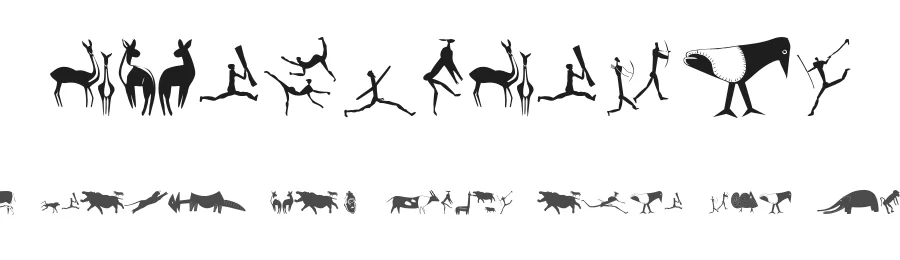
AfriquArtes is a display dingbat font offering 197 decorative characters that brings cultural and artistic dimension to creative projects. With support for over 104 languages across the Latin character set, this typeface bridges cultures while delivering a rich palette of distinctive symbols and ornamental marks. The Regular weight provides consistent visual balance across all decorative elements, making it straightforward to integrate into designs without requiring optical adjustments or pairing constraints.
This font excels in decorative applications where custom ornaments and symbols enhance rather than carry the primary message. Scrapbooking layouts gain depth from its ornamental character set, as do DIY craft projects that need distinctive dividers, flourishes, and embellishments. Social media graphics and seasonal greeting cards benefit from the font's symbolic palette, adding visual interest without competing with imagery or headlines. Wedding invitation suites, program covers, and announcement cards employ AfriquArtes to introduce elegant decorative accents that frame the main typography and strengthen overall presentation.
AfriquArtes is free for personal use only, with commercial licensing available from the designer. When your project calls for symbolic ornamentation rather than body text, AfriquArtes delivers the visual depth and cultural character that transforms functional spacing into intentional, considered design.
Style & Use Cases
- Overall Style
- Eye-catching, Bold, Dingbats
- Use Case
- Headlines, Logos
- Ideal For
- posters, branding, and social media graphics
- Pairs With
- a readable sans or serif for body
AfriquArtes Specifications
| Font Family | AfriquArtes |
| Style | Regular |
| Full Name | AfriquArtes |
| Version | 1.0 2004-04-08 |
| Weight | 500 (Medium) |
| Glyph Count | 197 glyphs |
| PostScript Name | AfriquArtes |
| Format | TTF (TrueType) |
| File Size | 156.5 KB |
Languages Supported
AfriquArtes supports 104 languages.
How to Install AfriquArtes Font
Step-by-step instructions for every platform
- 1Download the AfriquArtes font file (.ttf or .otf).
- 2Locate the downloaded file in your Downloads folder.
- 3Right-click the font file.
- 4Select "Install" to install for the current user, or "Install for all users" to make it available system-wide.
- 5AfriquArtes is now available in Word, Photoshop, Illustrator, and all other apps.
Browse fonts by theme
Curated collections →Saw a font in a picture? Identify any font from an image with our free Font Finder.
More Display Fonts
Browse all →







What pairs well with AfriquArtes Font?
AfriquArtes Font is a display font that shines as a display or heading face. Pair it with a clean sans-serif or serif font for body text — the contrast creates a clear hierarchy while the two styles stay balanced and easy to read.




Premium Display Fonts
★ PremiumWant something with more weights, glyphs, and commercial polish? These premium display fonts are worth a look.




AfriquArtes Font
Reviewed by the FontBoxDL team · Updated October 2026
License: Free for personal use