 Firefox
 1 / 4
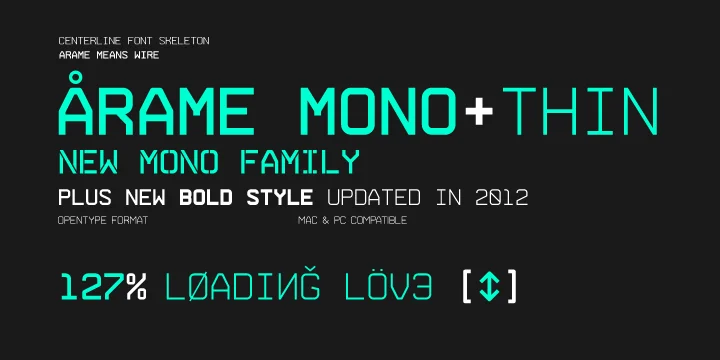
1 / 4About 0ARAME MONO Font
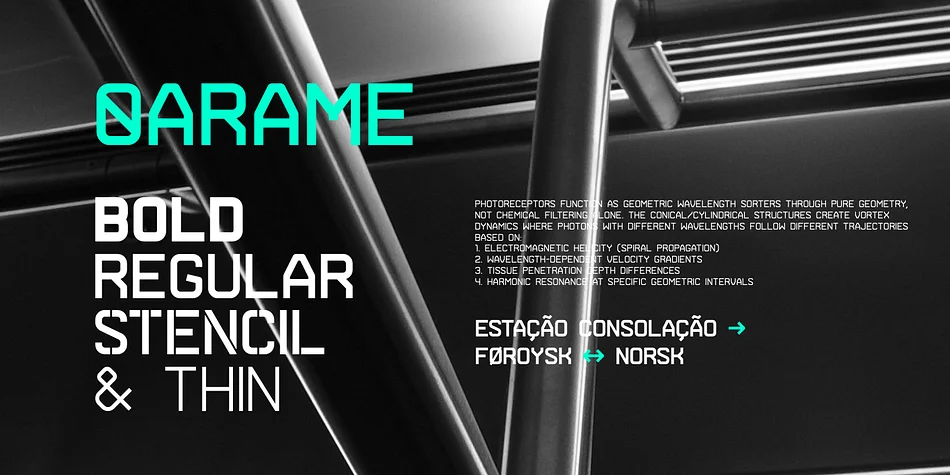
Picture a sleek control panel for a tech startup's website header, or the glowing interface elements in a sci-fi film. That's the aesthetic 0ARAME MONO brings to the table. Designed by Hitype, this monospace display typeface carries genuine industrial weight, built from clean, precise letterforms that feel at home in high-tech settings. The font earned its reputation through visible work in blockbuster film productions and video game interface design, where it had to communicate clarity and precision in digital spaces.
0ARAME MONO works best when you need that authentic tech-forward look. Sci-fi movie posters and game HUD designs benefit immediately from its structured feel, as do tech startup pitch decks and control room aesthetics. The visual character translates equally well onto retro-futuristic packaging, branded merchandise, and digital art installations where mechanical precision carries weight. Built as a monospace display font, each character maintains equal width, which keeps complex layouts feeling intentional rather than scattered or chaotic.
Practically speaking, what sets this typeface apart is its versatility across different scales. Deploy it large for maximum visual impact, or scale it smaller for detailed interface work and still maintain legibility. Pick up 0ARAME MONO on Creative Fabrica to bring that calculated tech edge to your next project.
Style & Use Cases
- Overall Style
- Eye-catching, Bold
- Use Case
- Headlines, Logos
- Ideal For
- posters, branding, and social media graphics
- Pairs With
- a readable sans or serif for body
How to Install 0ARAME MONO Font
Step-by-step instructions for every platform
- 1Download the 0ARAME MONO font file (.ttf or .otf).
- 2Locate the downloaded file in your Downloads folder.
- 3Right-click the font file.
- 4Select "Install" to install for the current user, or "Install for all users" to make it available system-wide.
- 50ARAME MONO is now available in Word, Photoshop, Illustrator, and all other apps.
More by Hitype
View all →
Browse fonts by theme
Curated collections →Saw a font in a picture? Identify any font from an image with our free Font Finder.
More Display Fonts
Browse all →







What pairs well with 0ARAME MONO Font?
0ARAME MONO Font is a display font that shines as a display or heading face. Pair it with a clean sans-serif or serif font for body text — the contrast creates a clear hierarchy while the two styles stay balanced and easy to read.




0ARAME MONO Font
by Hitype
Reviewed by the FontBoxDL team · Updated September 2026