 Firefox
 1 / 8
1 / 8About United Scripts Font
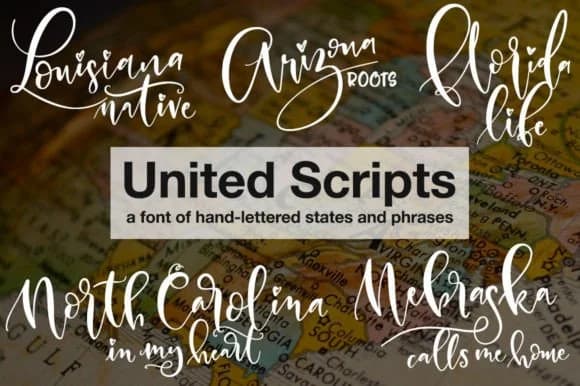
Picture yourself designing a personalized print celebrating someone's home state, or creating a set of patriotic stationery with hand-lettered charm. That's where United Scripts by GeekMissy shines. This dingbat font replaces standard letters with hand-written U.S. state names, letting you build entire compositions with just a few keystrokes.
Every letter key pulls a different state name in authentic script, arranged alphabetically from Alabama through Wyoming. Washington D.C. takes the X key, giving you complete coverage of all fifty states plus the capital. Number keys and punctuation marks unlock supporting phrases like "My Heart Is In," "Native," and "Calls Me Home," designed to pair perfectly with the state names in both script and all-caps versions.
This makes United Scripts ideal for wedding invitation suites with a regional theme, personalized home decor celebrating where someone's from, scrapbooking layouts documenting travels across America, and Etsy sellers creating state pride merchandise. The hand-lettered quality gives every design an artisanal feel without requiring actual calligraphy skills. Both OTF and TTF files are included, with a reference guide mapping each state and phrase to its keyboard position. The entire set works beautifully at display sizes, making it perfect for headers and focal points in any design. Grab United Scripts on Creative Fabrica and add genuine character to your state-themed projects.
Style & Use Cases
- Overall Style
- Iconographic, United Scripts
- Use Case
- Icons, Accents
- Ideal For
- ornaments, bullets, and decorative flourishes
- Pairs With
- any text font
How to Install United Scripts Font
Step-by-step instructions for every platform
- 1Download the United Scripts font file (.ttf or .otf).
- 2Locate the downloaded file in your Downloads folder.
- 3Right-click the font file.
- 4Select "Install" to install for the current user, or "Install for all users" to make it available system-wide.
- 5United Scripts is now available in Word, Photoshop, Illustrator, and all other apps.
More by GeekMissy
View all →
Browse fonts by theme
Curated collections →Saw a font in a picture? Identify any font from an image with our free Font Finder.
More Dingbats Fonts
Browse all →







What pairs well with United Scripts Font?
United Scripts Font is a versatile dingbats font that works for both headings and body text. Pair it with a contrasting sans-serif or serif font to add visual interest and a clear distinction between titles and body copy.



United Scripts Font
by GeekMissy
Reviewed by the FontBoxDL team · Updated June 2026