 Firefox
 1 / 8
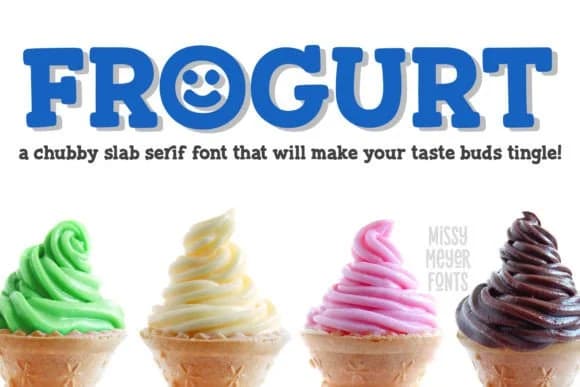
1 / 8About Frogurt Font
Warm and playful, Frogurt commands immediate affection. Designed by GeekMissy, this slab serif draws from the charm of hand-carved wooden signage, translating that vintage, tactile quality into a digital form that genuinely works. The search for something equally soft and unconventionally styled led nowhere, so the logical answer was to design it from the ground up.
What makes Frogurt distinctive is its commitment to the concept. Pillowy serifs give each letterform a lived-in, friendly quality, while a slightly wandering baseline and deliberate weight variation keep things dynamic without sacrificing readability. The outlines stay crisp throughout, so the font performs equally well for offset printing and cutting shapes with precision tools.
This typeface finds its niche in specific applications: artisan bakery and coffee roaster branding, vintage poster campaigns, wine and craft beverage labeling, or handmade candle and soap packaging where a softer serif builds trust with customers. The font supplies more than 570 glyphs total, including 310 extended Latin characters to support international languages and 50-plus alternates and ligatures for added personality and variation. Pair it with a clean, modern sans-serif for body text to maintain clear hierarchy. Find Frogurt on Creative Fabrica and explore how its distinctive character can shape your brand's visual voice.
Style & Use Cases
- Overall Style
- Sturdy, Confident
- Use Case
- Headlines, Merch
- Ideal For
- vintage posters, logos, and product packaging
- Pairs With
- a light sans-serif
How to Install Frogurt Font
Step-by-step instructions for every platform
- 1Download the Frogurt font file (.ttf or .otf).
- 2Locate the downloaded file in your Downloads folder.
- 3Right-click the font file.
- 4Select "Install" to install for the current user, or "Install for all users" to make it available system-wide.
- 5Frogurt is now available in Word, Photoshop, Illustrator, and all other apps.
More by GeekMissy
View all →
Browse fonts by theme
Curated collections →Saw a font in a picture? Identify any font from an image with our free Font Finder.
More Slab Serif Fonts
Browse all →







What pairs well with Frogurt Font?
Frogurt Font is a slab serif font that shines as a display or heading face. Pair it with a clean sans-serif or serif font for body text — the contrast creates a clear hierarchy while the two styles stay balanced and easy to read.



Frogurt Font
by GeekMissy
Reviewed by the FontBoxDL team · Updated August 2026