 Firefox
 1 / 8
1 / 8About Kookyheads Font
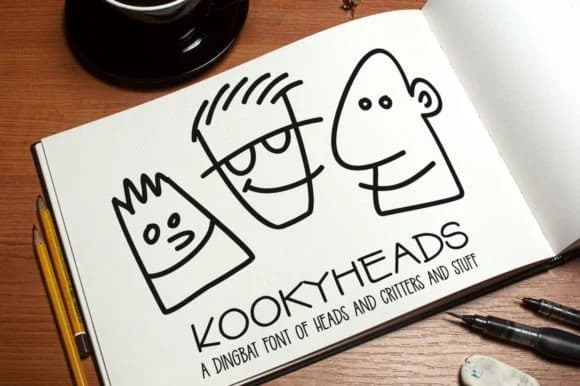
This font brings instant playfulness to anything it touches. Kookyheads, designed by GeekMissy, is a dingbat collection of cartoon heads and creatures perfect for adding personality to your work.
The font includes 75 pre-built character faces and doodles, plus 11 blank head shapes and 38 separate feature parts (eyes, glasses, mouths) you can combine to build custom faces. Since each element maps to a keyboard key, there's no need for special software; just type to access them all. The PDF guide tells you which key produces which head or part, so finding exactly what you need takes seconds. This works beautifully for vinyl cutting designs and projects, playful kids' party invitation designs, personalized greeting cards, and custom sticker sheets for print or digital use.
You can use the heads exactly as they come, or ungroup and remix the features to create your own unique character combinations. Pair Kookyheads with a friendly sans-serif like Open Sans for any accompanying text, and you'll have a design system that feels cohesive and approachable. Both OTF and TTF file formats are included, so you're covered no matter your workflow. Find it on Creative Fabrica and start building these quirky characters into your next project.
Style & Use Cases
- Overall Style
- Iconographic, Kookyheads
- Use Case
- Icons, Accents
- Ideal For
- ornaments, bullets, and decorative flourishes
- Pairs With
- any text font
How to Install Kookyheads Font
Step-by-step instructions for every platform
- 1Download the Kookyheads font file (.ttf or .otf).
- 2Locate the downloaded file in your Downloads folder.
- 3Right-click the font file.
- 4Select "Install" to install for the current user, or "Install for all users" to make it available system-wide.
- 5Kookyheads is now available in Word, Photoshop, Illustrator, and all other apps.
More by GeekMissy
View all →
Browse fonts by theme
Curated collections →Saw a font in a picture? Identify any font from an image with our free Font Finder.
More Dingbats Fonts
Browse all →







What pairs well with Kookyheads Font?
Kookyheads Font is a versatile dingbats font that works for both headings and body text. Pair it with a contrasting sans-serif or serif font to add visual interest and a clear distinction between titles and body copy.



Kookyheads Font
by GeekMissy
Reviewed by the FontBoxDL team · Updated July 2026