 Firefox
 1 / 5
1 / 5About Bloomdings Font
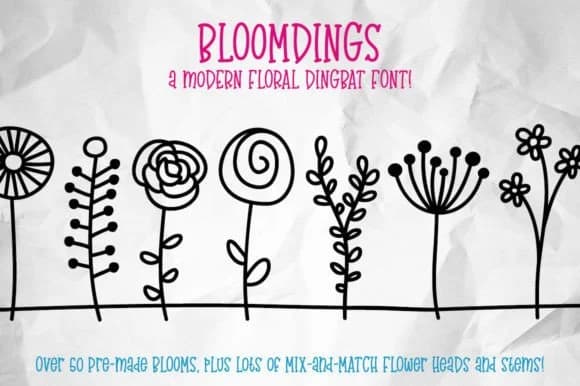
Imagine you're laying out a scrapbook spread or designing a greeting card and you need floral accents that feel modern and organic. Bloomdings, created by GeekMissy, is a dingbat font loaded with over 50 distinct flowers and greenery elements that type directly from your keyboard. No special software needed. Just open your design tool and start typing letters to reveal coordinated blossoms.
The real strength here is the modular approach. Beyond the 52 complete flowers mapped to A-Z keys, you get individual parts: flower heads, stems, and ground elements scattered across punctuation and number keys. This means you can layer pieces to build custom arrangements that feel uniquely yours. It works beautifully for journal spreads, handmade greeting card suites, vinyl cutting projects, and even custom candle labels or packaging mockups. Since all glyphs map to standard keyboard characters, the learning curve is minimal. GeekMissy included a PDF guide so you can quickly locate which key produces which element.
The download includes both OTF and TTF versions, giving you flexibility across design software. Modern and abstract rather than literal, the flowers adapt well to contemporary aesthetics alongside serif or sans-serif typography. Find Bloomdings on Creative Fabrica and unlock botanical designs without wrestling with glyph tables.
Style & Use Cases
- Overall Style
- Iconographic
- Use Case
- Icons, Accents
- Ideal For
- ornaments, bullets, and decorative flourishes
- Pairs With
- any text font
How to Install Bloomdings Font
Step-by-step instructions for every platform
- 1Download the Bloomdings font file (.ttf or .otf).
- 2Locate the downloaded file in your Downloads folder.
- 3Right-click the font file.
- 4Select "Install" to install for the current user, or "Install for all users" to make it available system-wide.
- 5Bloomdings is now available in Word, Photoshop, Illustrator, and all other apps.
More by GeekMissy
View all →
Browse fonts by theme
Curated collections →Saw a font in a picture? Identify any font from an image with our free Font Finder.
More Dingbats Fonts
Browse all →







What pairs well with Bloomdings Font?
Bloomdings Font is a versatile dingbats font that works for both headings and body text. Pair it with a contrasting sans-serif or serif font to add visual interest and a clear distinction between titles and body copy.



Bloomdings Font
by GeekMissy
Reviewed by the FontBoxDL team · Updated June 2026