 Firefox
 1 / 8
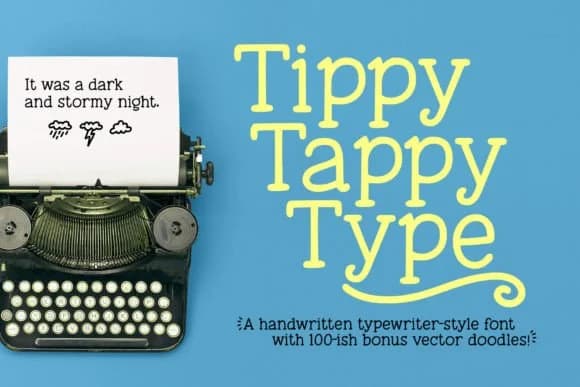
1 / 8About Tippy Tappy Type Font
Picture a child's birthday invitation, handwritten in chunky, cheerful letters. Tippy Tappy Type, designed by GeekMissy, captures that same warmth and playfulness in a typewriter-style slab serif that feels genuinely human, not slick. The font's charm comes from its hand-drawn origins: GeekMissy sketched every letter by hand before refining it for crisp printing and cutting, giving it personality that templates can't match.
This font shines in work where personality matters. Scrapbooking layouts, DIY craft labels, children's book spreads, and playful social media graphics all benefit from its friendly weight and clear letterforms. The 100+ bonus doodles, arrows, and flourishes (included as separate SVG and EPS files) let you add visual texture without hunting for graphics elsewhere. Use them in design apps or cut them out with craft tools; these extras expand what you can build with a single font purchase.
GeekMissy included the full toolkit: multiple file formats (OTF, TTF, WOFF), support for over 300 extended Latin characters across Western and Eastern European languages, and alternate oldstyle figures for variety. The slab serifs hold up beautifully at large display sizes, and the extended character set means you can set text in dozens of languages. Grab Tippy Tappy Type on Creative Fabrica and start your next project with a typeface that looks like it was drawn by a friend.
Style & Use Cases
- Overall Style
- Sturdy, Confident, Tippy
- Use Case
- Headlines, Merch
- Ideal For
- vintage posters, logos, and product packaging
- Pairs With
- a light sans-serif
How to Install Tippy Tappy Type Font
Step-by-step instructions for every platform
- 1Download the Tippy Tappy Type font file (.ttf or .otf).
- 2Locate the downloaded file in your Downloads folder.
- 3Right-click the font file.
- 4Select "Install" to install for the current user, or "Install for all users" to make it available system-wide.
- 5Tippy Tappy Type is now available in Word, Photoshop, Illustrator, and all other apps.
More by GeekMissy
View all →
Browse fonts by theme
Curated collections →Saw a font in a picture? Identify any font from an image with our free Font Finder.
More Slab Serif Fonts
Browse all →







What pairs well with Tippy Tappy Type Font?
Tippy Tappy Type Font is a slab serif font that shines as a display or heading face. Pair it with a clean sans-serif or serif font for body text — the contrast creates a clear hierarchy while the two styles stay balanced and easy to read.



Tippy Tappy Type Font
by GeekMissy
Reviewed by the FontBoxDL team · Updated August 2026