 Firefox
 1 / 8
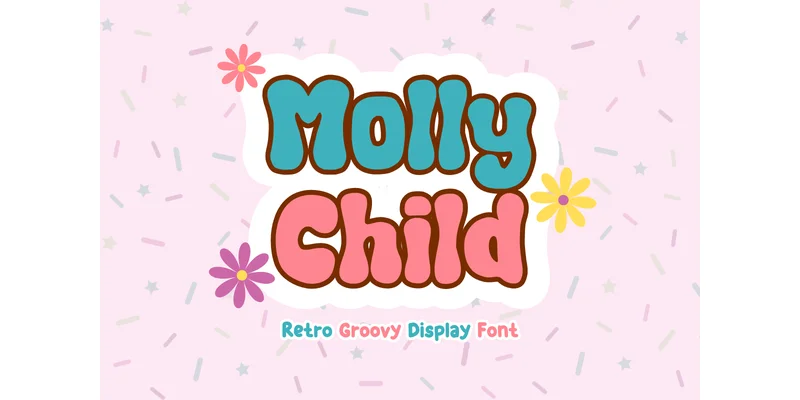
1 / 8About Molly Child Font
Molly Child by Minimalist Eyes brings a distinctly groovy, retro aesthetic to display work through its chunky letterforms and playful personality that immediately catches the eye. This typeface captures that nostalgic 70s and 80s energy with genuine warmth, making it the right choice whenever designs need instant visual impact and character. Groovy t-shirt graphics, retro back-to-school labels, vintage merchandise designs, and nostalgic vinyl sticker packs all come alive when set in this font, bringing personality to work that might otherwise feel generic. The design includes the full range you'd need: uppercase and lowercase letters, numerals, and punctuation marks, all available across OTF, TTF, and WOFF formats. Installation is straightforward, and it integrates smoothly with Adobe apps on both Mac and PC systems.
This suits anyone building playful, kid-focused designs or tapping into that sweet spot where retro kitsch meets genuine visual charm. Layered artwork, sublimation printing projects, and sticker design benefit particularly from its bold, graphic nature and chunky character widths that read clearly even when scaled down. If you're drawn to retro styling and want your designs to feel like they walked straight out of a 70s or 80s Saturday morning cartoon, this one delivers exactly that energy. Get it on Creative Fabrica.
Style & Use Cases
- Overall Style
- Eye-catching, Bold, Autumn
- Use Case
- Headlines, Logos
- Ideal For
- posters, branding, and social media graphics
- Pairs With
- a readable sans or serif for body
How to Install Molly Child Font Font
Step-by-step instructions for every platform
- 1Download the Molly Child Font font file (.ttf or .otf).
- 2Locate the downloaded file in your Downloads folder.
- 3Right-click the font file.
- 4Select "Install" to install for the current user, or "Install for all users" to make it available system-wide.
- 5Molly Child Font is now available in Word, Photoshop, Illustrator, and all other apps.
More by Minimalist Eyes
View all →
Browse fonts by theme
Curated collections →Saw a font in a picture? Identify any font from an image with our free Font Finder.
More Display Fonts
Browse all →







What pairs well with Molly Child Font?
Molly Child Font is a display font that shines as a display or heading face. Pair it with a clean sans-serif or serif font for body text — the contrast creates a clear hierarchy while the two styles stay balanced and easy to read.




Molly Child Font
Reviewed by the FontBoxDL team · Updated October 2026
One-time purchase