
 1 / 7
1 / 7About Gardenia Font
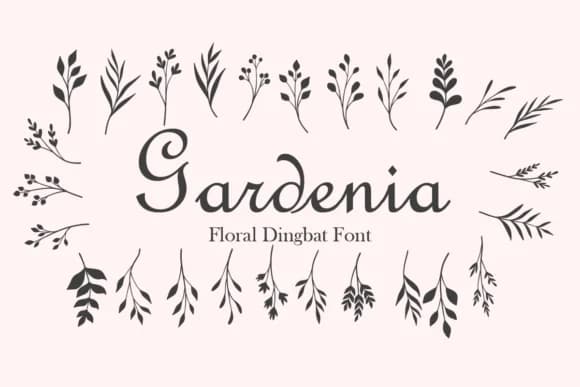
Imagine laying out a wedding invitation and searching for botanical accents that feel hand-drawn rather than corporate. Gardenia, from designer Minimalist Eyes, is a dingbats font built around nature elements: leaves, branches, and delicate botanical silhouettes you can weave into card designs, border treatments, and decorative flourishes throughout your layout. The strength here is restraint, allowing these marks to enhance your composition without overwhelming or pulling focus from the main content.
You'll find these dingbats work beautifully in formal wedding stationery, event place card designs, and invitation suite embellishments where subtle detail builds visual interest and sophistication. Beyond weddings, they shine in botanical product packaging, craft project labels, and independent brand work where organic texture reads as intentional rather than decorative filler. The font provides both uppercase and lowercase character variations, giving you flexibility to mix and combine glyphs for visual variety and custom arrangements.
Since each glyph renders cleanly at any size, from tiny punctuation marks to large corner elements, you can deploy them across your design with confidence. Get Gardenia on Creative Fabrica and add hand-drawn botanical warmth to your next project.
Style & Use Cases
- Overall Style
- Iconographic, Doodle Font
- Use Case
- Icons, Accents
- Ideal For
- ornaments, bullets, and decorative flourishes
- Pairs With
- any text font
How to Install Gardenia Font
Step-by-step instructions for every platform
- 1Download the Gardenia font file (.ttf or .otf).
- 2Locate the downloaded file in your Downloads folder.
- 3Right-click the font file.
- 4Select "Install" to install for the current user, or "Install for all users" to make it available system-wide.
- 5Gardenia is now available in Word, Photoshop, Illustrator, and all other apps.
More by Minimalist Eyes
View all →
Browse fonts by theme
Curated collections →Saw a font in a picture? Identify any font from an image with our free Font Finder.
More Dingbats Fonts
Browse all →







What pairs well with Gardenia Font?
Gardenia Font is a versatile dingbats font that works for both headings and body text. Pair it with a contrasting sans-serif or serif font to add visual interest and a clear distinction between titles and body copy.



Gardenia Font
Reviewed by the FontBoxDL team · Updated July 2026