 Firefox
 1 / 9
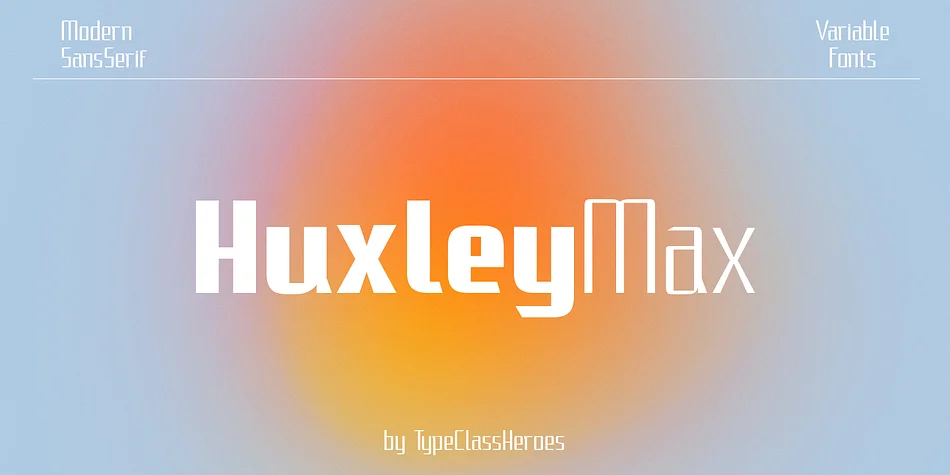
1 / 9About HuxleyMax Font
HuxleyMax by TypeClassHeroes is a contemporary sans serif display that thrives on versatility. Variable width and weight options give you real control over how text behaves on the page, letting you build rhythm and visual hierarchy without swapping typefaces. You can explore and combine multiple width and weight combinations to calibrate the right balance for luxury brand identity work, modern product packaging, event invitations and stationery, apparel graphics, and specialty retail signage alike.
Both outline and TrueType files come standard, alongside modern web formats (WOFF and WOFF2) for broader compatibility. Full uppercase and lowercase coverage, numerals and punctuation, international character support across multiple languages, and alternative glyphs all expand your toolkit when you want subtle variation in specific letters or need to adapt to different typographic situations.
This is a workhorse display font that handles everything from retail signage and editorial headlines to branded quotes and design projects. Flexibility built into the variable system lets you adapt HuxleyMax to whatever each composition demands, rather than being locked into one look. Grab it from Creative Fabrica and discover how width and weight shifts reshape your work.
Style & Use Cases
- Overall Style
- Eye-catching, Bold
- Use Case
- Headlines, Logos
- Ideal For
- posters, branding, and social media graphics
- Pairs With
- a readable sans or serif for body
How to Install HuxleyMax Font
Step-by-step instructions for every platform
- 1Download the HuxleyMax font file (.ttf or .otf).
- 2Locate the downloaded file in your Downloads folder.
- 3Right-click the font file.
- 4Select "Install" to install for the current user, or "Install for all users" to make it available system-wide.
- 5HuxleyMax is now available in Word, Photoshop, Illustrator, and all other apps.
More by TypeClassHeroes
View all →
Browse fonts by theme
Curated collections →Saw a font in a picture? Identify any font from an image with our free Font Finder.
More Display Fonts
Browse all →







What pairs well with HuxleyMax Font?
HuxleyMax Font is a display font that shines as a display or heading face. Pair it with a clean sans-serif or serif font for body text — the contrast creates a clear hierarchy while the two styles stay balanced and easy to read.




HuxleyMax Font
Reviewed by the FontBoxDL team · Updated September 2026