 Firefox
 1 / 10
About Polyphia Font
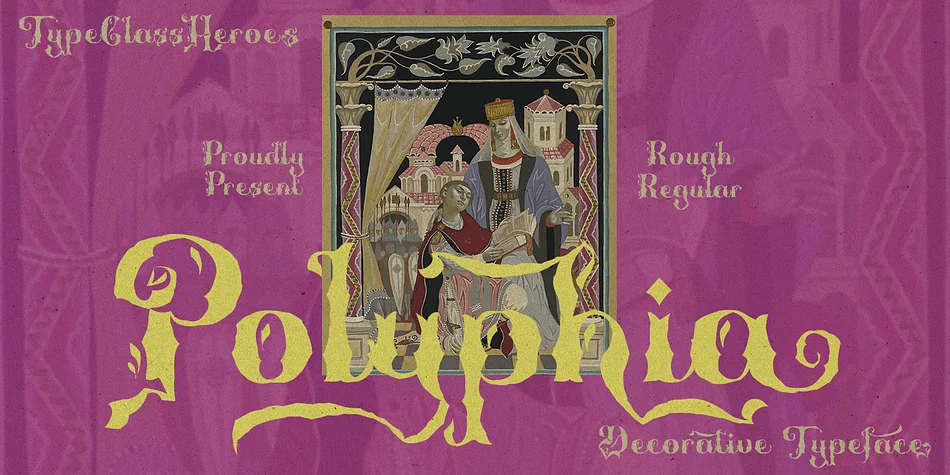
Polyphia by TypeClassHeroes captures organic strength through curves that mimic bamboo's natural structure: sturdy yet supple, each stroke carrying that distinctive natural flexibility. The font comes in both regular and rough versions, giving you real control over how much texture and handmade character you bring to your work. Wedding invitation suites, Japanese-inspired home decor signage, and artisan tea or cosmetics packaging all benefit from these confident letterforms that carry cultural weight without feeling forced. The rough variant specifically adds an intentional, handmade quality perfect for boutique branding where authenticity and personality matter most.
The decorative style is restrained enough that it reads clearly in headlines while maintaining that botanical elegance throughout. Upscale restaurant menus, Asian-culture themed campaigns, and premium gift packaging all work beautifully with this careful balance between ornamentation and legibility. You get international glyphs, alternate letterforms, and ligatures built in across OTF, TTF, WOFF, and WOFF2 formats, so you have the flexibility to customize how letters interact on screen or in print.
Consider Polyphia when your project needs decorative weight without excess, or when you want typography that references nature and cultural tradition with genuine honesty and clear intention. Grab it on Creative Fabrica to start exploring both styles.
Style & Use Cases
- Overall Style
- Bold, Distinctive
- Use Case
- Headlines, Posters
- Ideal For
- logos, packaging, and standout titles
- Pairs With
- a neutral sans-serif
How to Install Polyphia Font
Step-by-step instructions for every platform
- 1Download the Polyphia font file (.ttf or .otf).
- 2Locate the downloaded file in your Downloads folder.
- 3Right-click the font file.
- 4Select "Install" to install for the current user, or "Install for all users" to make it available system-wide.
- 5Polyphia is now available in Word, Photoshop, Illustrator, and all other apps.
More by TypeClassHeroes
View all →
Browse fonts by theme
Curated collections →Saw a font in a picture? Identify any font from an image with our free Font Finder.
More Decorative Fonts
Browse all →







What pairs well with Polyphia Font?
Polyphia Font is a decorative font that shines as a display or heading face. Pair it with a clean sans-serif or serif font for body text — the contrast creates a clear hierarchy while the two styles stay balanced and easy to read.




Polyphia Font
Reviewed by the FontBoxDL team · Updated June 2026