 Firefox
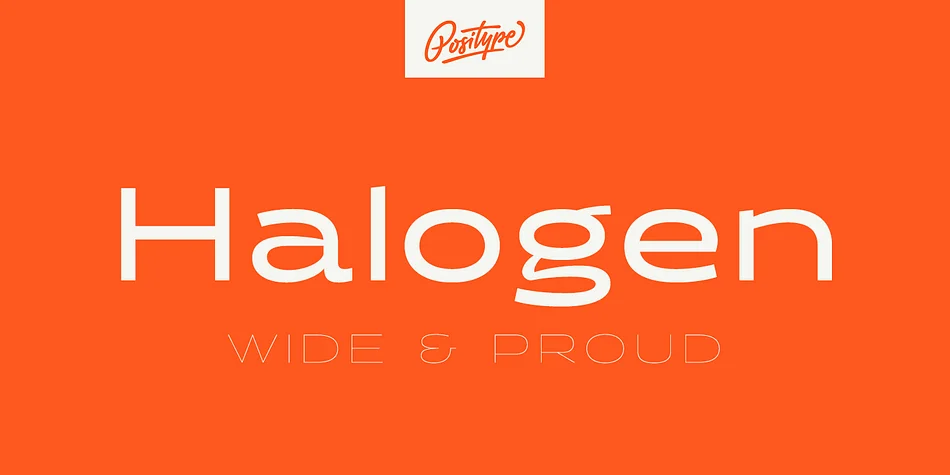 1 / 6
1 / 6About Halogen Font
Imagine laying out a magazine spread where the headline needs to command attention but still feel carefully considered. That's where Halogen by Positype enters the room. This wide, contemporary sans-serif carries real personality, drawing from hand-lettering traditions while maintaining precision under the hood. The letterforms retain stresses and modulation you'd find in brushwork, with naturally tapered terminals that resist the grid-based flatness that dominates modern typefaces.
Halogen shines on editorial covers and luxury packaging where restraint matters as much as impact. It works equally well in retro-inspired design or futuristic contexts, making it a genuine bridge typeface. Music venue posters, high-end fashion lookbooks, boutique restaurant menus, and gallery signage all benefit from its distinctive voice. The font includes lowercase and small caps alongside old-style numerals, tabular forms, stylistic alternates, and fractions, so you're not compromising on functionality. These features mean you can fine-tune everything from financial statements to display settings without hunting for supplementary fonts.
What really sets Halogen apart is the deliberation behind every letterform. It's the kind of typeface that rewards close inspection while performing beautifully at large sizes, whether printed or on screen. Grab it on Creative Fabrica and start building designs with a typeface that actually thinks for itself.
Style & Use Cases
- Overall Style
- Eye-catching, Bold
- Use Case
- Headlines, Logos
- Ideal For
- posters, branding, and social media graphics
- Pairs With
- a readable sans or serif for body
How to Install Halogen Font
Step-by-step instructions for every platform
- 1Download the Halogen font file (.ttf or .otf).
- 2Locate the downloaded file in your Downloads folder.
- 3Right-click the font file.
- 4Select "Install" to install for the current user, or "Install for all users" to make it available system-wide.
- 5Halogen is now available in Word, Photoshop, Illustrator, and all other apps.
More by Positype
View all →

Browse fonts by theme
Curated collections →Saw a font in a picture? Identify any font from an image with our free Font Finder.
More Display Fonts
Browse all →







What pairs well with Halogen Font?
Halogen Font is a display font that shines as a display or heading face. Pair it with a clean sans-serif or serif font for body text — the contrast creates a clear hierarchy while the two styles stay balanced and easy to read.




Halogen Font
by Positype
Reviewed by the FontBoxDL team · Updated September 2026