 Firefox
 1 / 10
About Grava Display Font
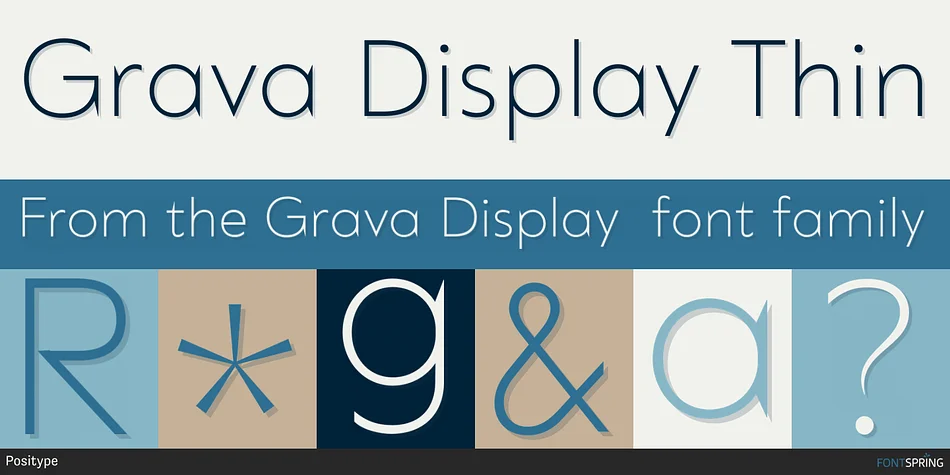
You're designing a striking poster that needs real visual impact without leaning too corporate, or maybe an album cover where geometric precision actually serves the composition. Grava Display, from Neil Summerour at Positype, delivers sharp geometry without the clinical sterility that typically haunts most fonts in this class. The Display version trades some refinement for more conspicuous angles and deliberately sharp points, giving it genuine attitude at poster sizes and beyond.
This typeface excels for record sleeves, gallery and exhibition posters, editorial magazine mastheads with a real point of view, and branded websites where the typography itself carries the identity and message. You get 20 weights running from Thin through Ultra, plus matching italics, all three writing systems (Latin, Cyrillic, Greek) bundled in one purchase, and built-in ligatures (NT, LL, GA, CO combinations and more) that reference midcentury modernism without feeling derivative. The numerals have real presence, sharp and angled enough that a sports jersey number or event announcement becomes visually distinctive just through the letterforms themselves.
Since all three scripts come in a single package, multilingual branding doesn't require hunting for separate fonts elsewhere. Get Grava Display on Creative Fabrica and put a typeface with this much personality to work.
Style & Use Cases
- Overall Style
- Eye-catching, Bold
- Use Case
- Headlines, Logos
- Ideal For
- posters, branding, and social media graphics
- Pairs With
- a readable sans or serif for body
How to Install Grava Display Font
Step-by-step instructions for every platform
- 1Download the Grava Display font file (.ttf or .otf).
- 2Locate the downloaded file in your Downloads folder.
- 3Right-click the font file.
- 4Select "Install" to install for the current user, or "Install for all users" to make it available system-wide.
- 5Grava Display is now available in Word, Photoshop, Illustrator, and all other apps.
More by Positype
View all →

Browse fonts by theme
Curated collections →Saw a font in a picture? Identify any font from an image with our free Font Finder.
More Display Fonts
Browse all →







What pairs well with Grava Display Font?
Grava Display Font is a display font that shines as a display or heading face. Pair it with a clean sans-serif or serif font for body text — the contrast creates a clear hierarchy while the two styles stay balanced and easy to read.




Grava Display Font
by Positype
Reviewed by the FontBoxDL team · Updated October 2026