 Firefox
 1 / 6
1 / 6Loading font…
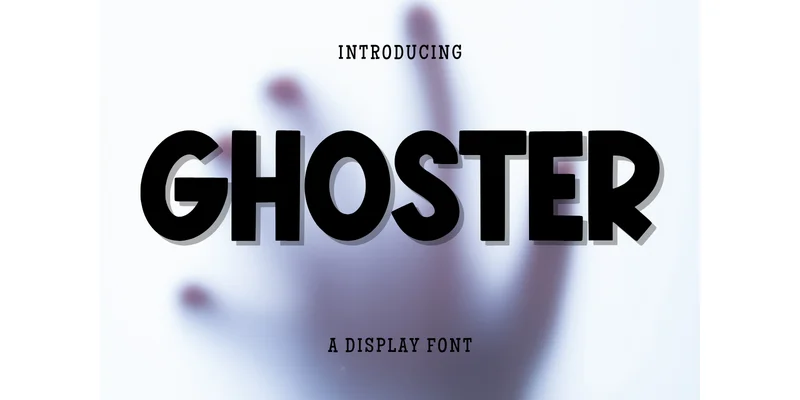
About Ghoster Font
You're laying out a birthday invitation suite, and you need type that feels genuinely fun but doesn't read as patronizing to kids flipping through the mail. Ghoster Font by Minimalist Eyes handles that balance perfectly. This display typeface brings a bold, friendly personality to projects where visual impact has to capture attention on first sight. Greeting card designs, retro album artwork, print-ready t-shirt graphics for young collections, scrapbook spreads, festive event decorations, and children's book covers all come alive with its rounded bubble letterforms and comic-inspired spirit.
The typeface holds its own when scaled large, and it works equally well on beverage labels and product packaging where genuine visual personality moves units off the shelves. Branding work that calls for authentic warmth without sacrificing real professional credibility finds a solid partner here. You get the full set: numbers, punctuation marks, and the complete lowercase alphabet, so you won't hit dead ends mid-project or discover missing glyphs at deadline. Once you start using it across different design projects, you'll notice the surprising range and versatility available from a single, thoughtfully-designed typeface. Grab it from Creative Fabrica and watch how quickly it becomes essential in your toolkit.
Style & Use Cases
- Overall Style
- Eye-catching, Bold, Album Design
- Use Case
- Headlines, Logos
- Ideal For
- posters, branding, and social media graphics
- Pairs With
- a readable sans or serif for body
How to Install Ghoster Font Font
Step-by-step instructions for every platform
- 1Download the Ghoster Font font file (.ttf or .otf).
- 2Locate the downloaded file in your Downloads folder.
- 3Right-click the font file.
- 4Select "Install" to install for the current user, or "Install for all users" to make it available system-wide.
- 5Ghoster Font is now available in Word, Photoshop, Illustrator, and all other apps.
More by Minimalist Eyes
View all →
Browse fonts by theme
Curated collections →Saw a font in a picture? Identify any font from an image with our free Font Finder.
More Display Fonts
Browse all →







What pairs well with Ghoster Font?
Ghoster Font is a display font that shines as a display or heading face. Pair it with a clean sans-serif or serif font for body text — the contrast creates a clear hierarchy while the two styles stay balanced and easy to read.




Ghoster Font
Reviewed by the FontBoxDL team · Updated October 2026
One-time purchase