 Firefox
 1 / 10
About Flova Font
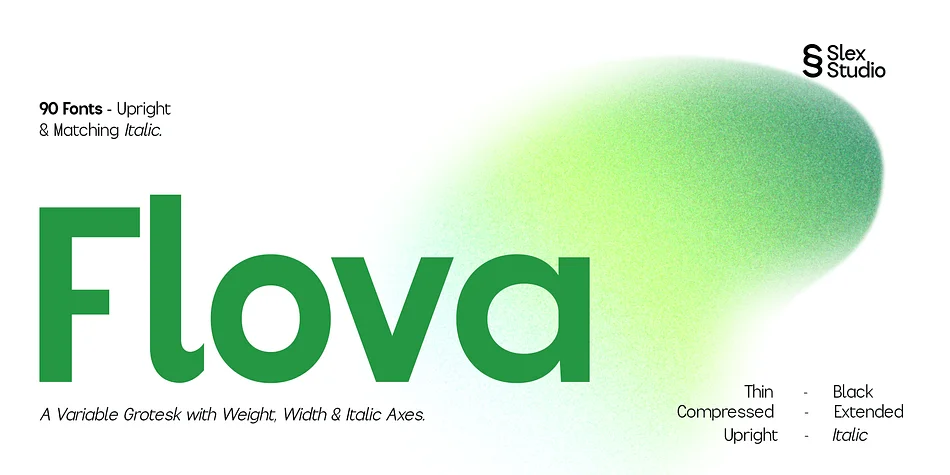
Picture designing a complete visual identity for a software startup where the same typeface needs to work from massive headline sizes down to microscopic UI labels. Flova, created by Slex Studio, is a contemporary variable display typeface engineered to solve exactly that kind of challenge. With a full Weight, Width, and Italic axis system, it delivers 90 distinct styles spanning Thin all the way to Black and Compressed to Extended widths. That flexibility means one typeface can genuinely replace five or six separate fonts in a traditional brand system.
The consistency across all those variations makes Flova particularly effective for venture pitch decks, SaaS landing pages, editorial feature layouts, and custom app interfaces. At large sizes the clean geometry reads boldly and direct; dial it down for UI and you get legibility with built-in character. Many designers working on app redesigns or establishing tech-forward brand identities find that variable axis system essential for maintaining visual cohesion across digital products and print collateral. The balanced construction holds together across sizes and contexts.
Available on Creative Fabrica, Flova gives your projects the controlled-yet-expressive typographic voice they deserve.
Style & Use Cases
- Overall Style
- Eye-catching, Bold
- Use Case
- Headlines, Logos
- Ideal For
- posters, branding, and social media graphics
- Pairs With
- a readable sans or serif for body
How to Install Flova Font
Step-by-step instructions for every platform
- 1Download the Flova font file (.ttf or .otf).
- 2Locate the downloaded file in your Downloads folder.
- 3Right-click the font file.
- 4Select "Install" to install for the current user, or "Install for all users" to make it available system-wide.
- 5Flova is now available in Word, Photoshop, Illustrator, and all other apps.
More by Slex Studio
View all →


Browse fonts by theme
Curated collections →Saw a font in a picture? Identify any font from an image with our free Font Finder.
More Display Fonts
Browse all →







What pairs well with Flova Font?
Flova Font is a display font that shines as a display or heading face. Pair it with a clean sans-serif or serif font for body text — the contrast creates a clear hierarchy while the two styles stay balanced and easy to read.




Flova Font
by Slex Studio
Reviewed by the FontBoxDL team · Updated September 2026