 Firefox
About Deco Wave Font
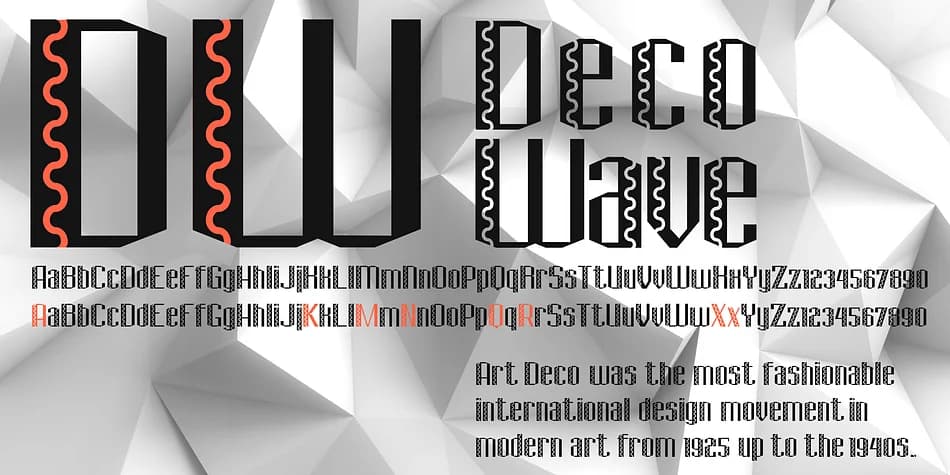
Deco Wave by FontHaus captures the geometric sophistication and bold elegance of 1920s modernism. This display typeface draws from Art Deco's signature geometry and clean lines, bringing that era's distinctive character to contemporary design work. The design pairs streamlined letterforms with a flowing, undulating quality that sets it apart from more rigid geometric fonts of the period. What makes it work is the balance between strength and grace: the letterforms feel substantial without being blocky or cold.
You'll find this typeface particularly effective for boutique hotel branding, vintage-inspired wedding invitation suites, high-end skincare and cosmetics packaging, and retro speakeasy signage and menus. The letterforms have enough personality to anchor a design without overwhelming layout or content, making it equally useful for standalone logos and headline work across multiple applications. The font's subtle curves recall the movement's fascination with stylized waves and flowing forms, giving it a sophisticated rather than kitschy feel even when set at large sizes. That balance between ornamentation and restraint is what keeps it feeling current.
Deco Wave suits designers who want display type with genuine historical character and contemporary sensibility. If you're looking to bring that sophisticated 1920s-40s aesthetic into your project without relying on overused vintage fonts, grab it from Creative Fabrica.
Style & Use Cases
- Overall Style
- Eye-catching, Bold
- Use Case
- Headlines, Logos
- Ideal For
- posters, branding, and social media graphics
- Pairs With
- a readable sans or serif for body
How to Install Deco Wave Font
Step-by-step instructions for every platform
- 1Download the Deco Wave font file (.ttf or .otf).
- 2Locate the downloaded file in your Downloads folder.
- 3Right-click the font file.
- 4Select "Install" to install for the current user, or "Install for all users" to make it available system-wide.
- 5Deco Wave is now available in Word, Photoshop, Illustrator, and all other apps.



Browse fonts by theme
Curated collections →Saw a font in a picture? Identify any font from an image with our free Font Finder.
More Display Fonts
Browse all →







What pairs well with Deco Wave Font?
Deco Wave Font is a display font that shines as a display or heading face. Pair it with a clean sans-serif or serif font for body text — the contrast creates a clear hierarchy while the two styles stay balanced and easy to read.



Deco Wave Font
by FontHaus
Reviewed by the FontBoxDL team · Updated September 2026