 Firefox
 1 / 5
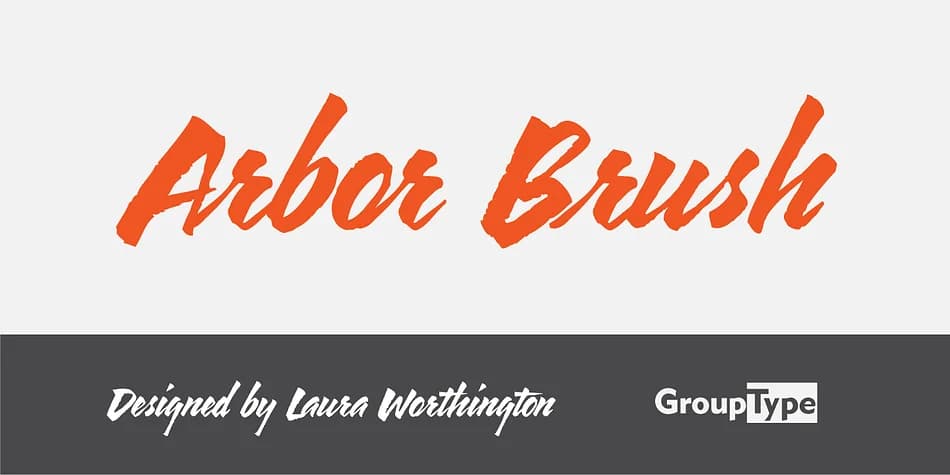
1 / 5About Arbor Brush Font
Arbor Brush by FontHaus is a confident brush script with an organic, hand-drawn energy that never wavers or hesitates. The letterforms are bold and decisive, each one carrying genuine character, movement, and personality. It reads with equal clarity when scaled up for display headlines or scaled down to smaller text on screen, making it practical for both print and digital applications. The design lands firmly in painterly territory without sacrificing legibility, making it versatile for polished professional work and expressive, casual contexts where visual personality drives the whole composition.
This script excels on wedding invitation suites, where formality and personality need to coexist on the same page. Restaurant menu headers and storefront signage benefit significantly from its warmth and inherent authority, creating immediate inviting presence. Boutique packaging labels and DIY craft projects especially suit its handmade aesthetic, offering the genuine artisanal quality that distinguishes independent brands and makers. Beyond these specific applications, the substantial alternate glyph set gives you real variation to work with, letting you swap letterforms to break up repetition and maintain visual interest across multiple projects and compositions.
Grab Arbor Brush on Creative Fabrica and put it to work on your next project.
Style & Use Cases
- Overall Style
- Eye-catching, Bold
- Use Case
- Headlines, Logos
- Ideal For
- posters, branding, and social media graphics
- Pairs With
- a readable sans or serif for body
How to Install Arbor Brush Font
Step-by-step instructions for every platform
- 1Download the Arbor Brush font file (.ttf or .otf).
- 2Locate the downloaded file in your Downloads folder.
- 3Right-click the font file.
- 4Select "Install" to install for the current user, or "Install for all users" to make it available system-wide.
- 5Arbor Brush is now available in Word, Photoshop, Illustrator, and all other apps.
More by FontHaus
View all →

Browse fonts by theme
Curated collections →Saw a font in a picture? Identify any font from an image with our free Font Finder.
More Display Fonts
Browse all →







What pairs well with Arbor Brush Font?
Arbor Brush Font is a display font that shines as a display or heading face. Pair it with a clean sans-serif or serif font for body text — the contrast creates a clear hierarchy while the two styles stay balanced and easy to read.



Arbor Brush Font
by FontHaus
Reviewed by the FontBoxDL team · Updated June 2026